
Adaptive Mining Tower UI
v1.0.8Customize Tower UI so it never grows too large while heavily modded.
- Source code
- No source provided
- Tags
- Quality of Life Tweaks UI
ADAPTIVE MINING TOWER UI
Prevent vehicles & other UI-Content from clipping out of view & becoming unselectable while heavily modded.
Features
• Excavators, Trucks, Materials & Import/Export sections can be expanded & collapsed.
• Choose which sections are expanded/collapsed by default
• Collapse-all & open-all button for quick changes.• Set 1-8 visible rows for each vanilla section.
• When a section's content exceeds that row limit, a vertical scrollbar appears.• Hide vehicles by fuel-type, individual vehicles or vehicles owned in your current world.
🗼 Expanded/collapsed states are saved per-tower.
⚙️ Settings: Default, rows, and vehicle filters are saved globally.🌐Supports all 21 game languages with all labels, text & tooltips.
Minimum Section Size
↪ Even with many vehicles, materials & storages assigned, the UI stays a good height.
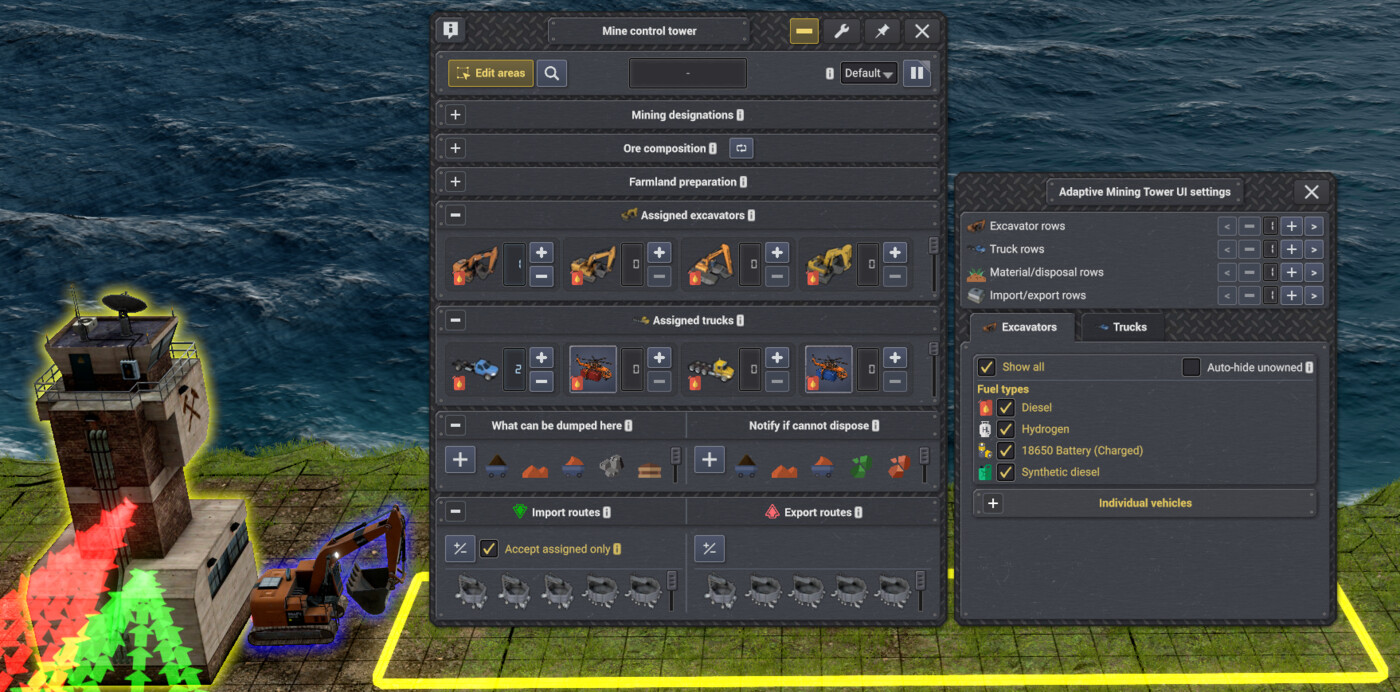
Filter by Fuel Type
↪ Useful when you're finished with diesel or previous fuel types.
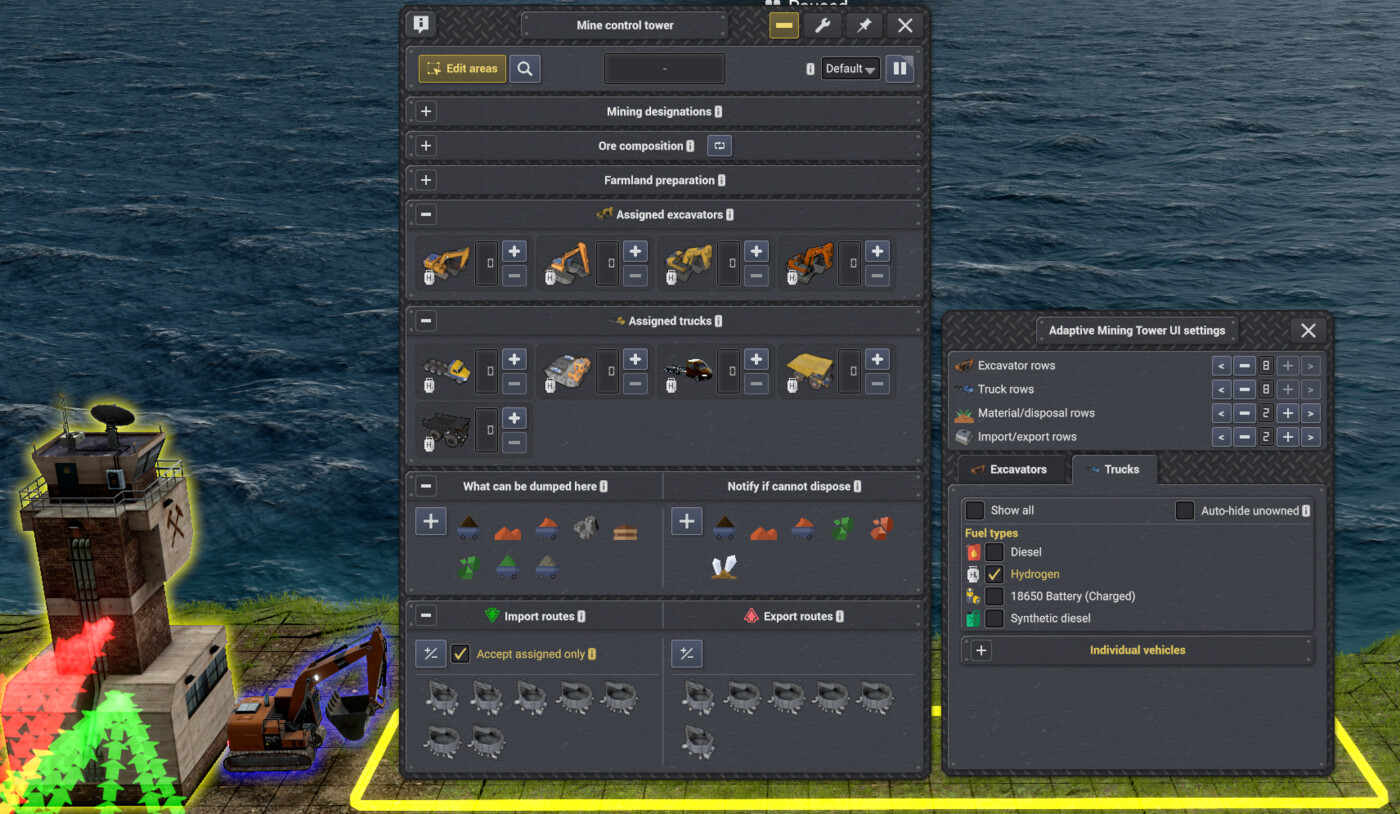
Filter by individual vehicle
• Show only the vehicles you want to see—hide unused vehicles.
• Auto-hide unowned to show only vehicles you've built
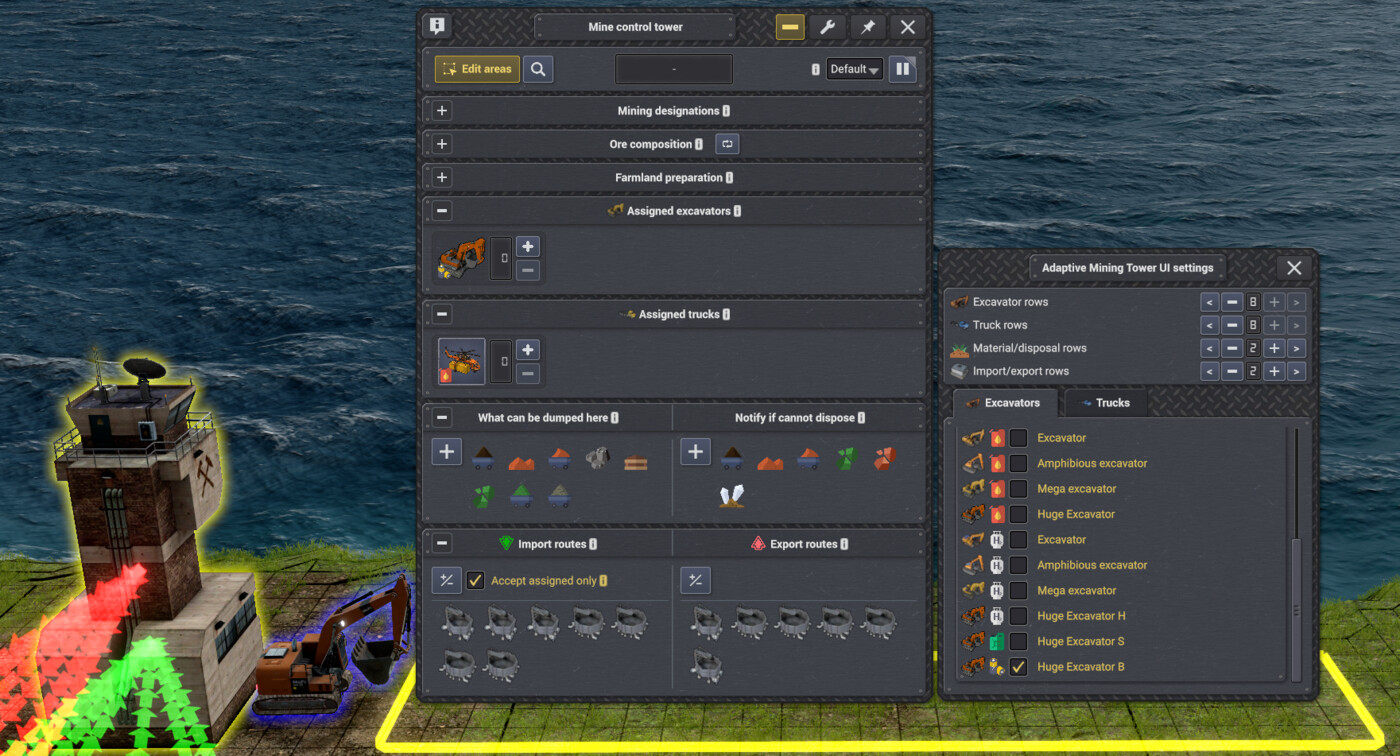
↪ If you still enjoy taller menu UI — I won't judge. Scrollbars will appear only when content exceeds row limit, so nothing gets squished.
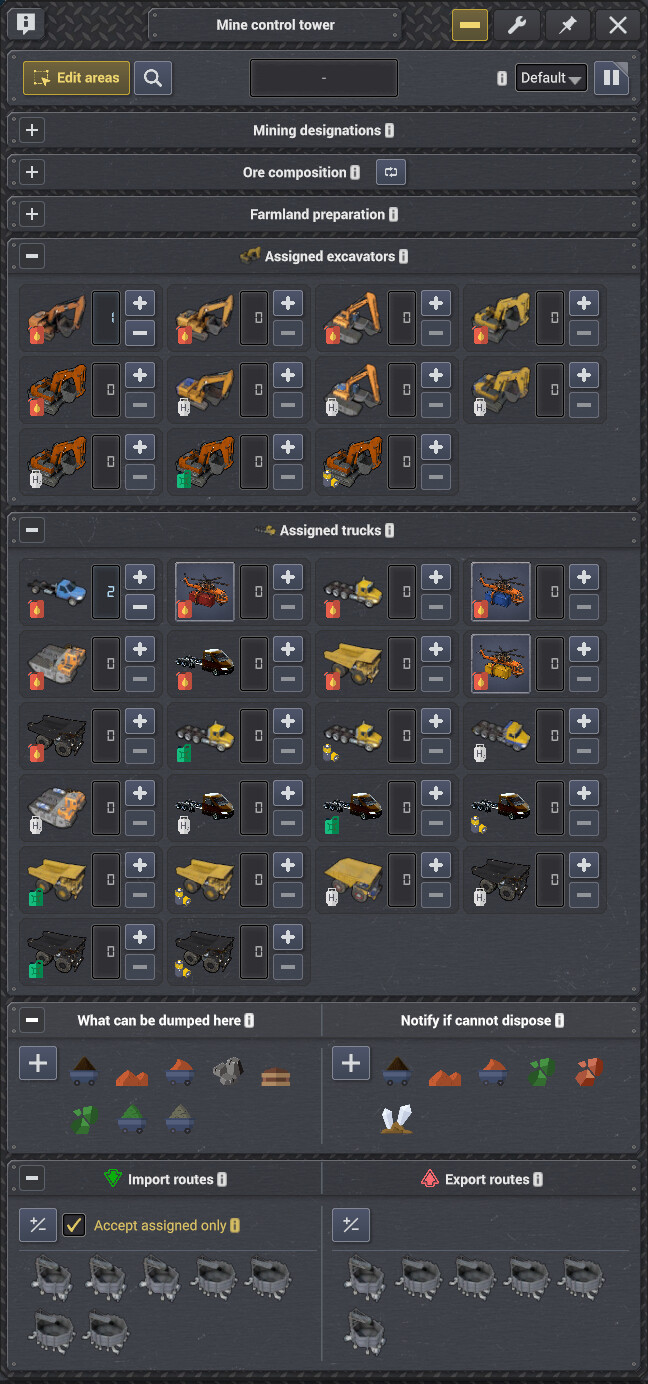
↪ No more modded Tower UI Jump-scares 😱
If you have any suggestions, found bugs, or any new mod or mod update causes new issues like double icons or clipped content, please report using the forum.
Languages
Català · 简体中文 · 繁體中文 · Čeština · Nederlands · Eesti · Français · Deutsch · Magyar · Italiano · 日本語 · 한국어 · Norsk bokmål · Polski · Português do Brasil · Русский · Español · Svenska · Türkçe · Українська
If you want to help make correction to the language files, you may past corrections here on the forum
No announcements yet.
v1.0.8
Latest- Game version
- 0.8.5 - 0.8.7a
- Released
- Aug 16, 2026
- File size
- 3.2 MB
- License
- MIT
* Adds a translated explanation to the Default tab for settings that apply to newly placed Mining Towers.
v1.0.7
- Game version
- 0.8.5 - 0.8.7a
- Released
- Aug 15, 2026
- File size
- 3.1 MB
- License
- MIT
* Adds a Default tab for choosing which sections start open on newly placed Mining Towers.
* Keeps existing per-tower collapsed states authoritative after a tower is placed.
* Uses Auto Terrain Designations' live localized section names when that mod is installed.
* Uses the Mining Tower's live localized section titles for the four vanilla default-state settings.
* Adds horizontal resizing to the settings window from its native width up to 130%.
* Verifies compatibility with Captain of Industry 0.8.7a.
v1.0.6
- Game version
- 0.8.5 - 0.8.7
- Released
- Aug 13, 2026
- File size
- 3.1 MB
- License
- MIT
* If Automatic Terrain Designations is installed, using collapse-all button will now properly saves the collapsed state of it's three sections, without needing to click them individually.
v1.0.5
- Game version
- 0.8.5 - 0.8.7
- Released
- Aug 09, 2026
- File size
- 3.1 MB
- License
- MIT
* Verifies compatibility with Captain of Industry 0.8.7.
* Adds Turkish and Traditional Chinese translations, completing support for all 21 languages available in the game.
v1.0.4
- Game version
- 0.8.5 - 0.8.6c
- Released
- Aug 04, 2026
- File size
- 3.1 MB
- License
- MIT
* Adds translations for 18 additional supported languages.
* Included languages include: Catalan, Simplified Chinese, Czech, Dutch, Estonian, French, German, Hungarian, Italian, Japanese, Korean, Norwegian Bokmål, Polish, Portuguese (Brazil), Russian, Spanish, Swedish, Ukrainian.
* Contact me on Discord or in the forums to make any needed corrections to the translations.
* Adjusted icons so they are the same in sections and settings for vehicles and import/export.
v1.0.3
- Game version
- 0.8.5 - 0.8.6c
- Released
- Aug 02, 2026
- File size
- 3.1 MB
- License
- MIT
* Fixes a load crash that could occur when no other installed mod preloaded the bundled Harmony library.
* Updates compatibility for Captain of Industry 0.8.6c.
* Cleaned up the settings menu created in first version.
* Find settings by clicking the top-right settings button in the Mining Tower UI.
* Expands features to four vanilla sections: Excavators, Trucks, Materials, and Import/Export.
* Row settings: Set a row limit; a scrollbar appears when reached, preventing further UI growth.
* Row & Filter settings are now saved between saves.
* Filter settings: Hide unused excavators and trucks from Mining Tower assignments automatically, or filter by fuel type or individual vehicle.
* Adds Collapse-all and Expand-all section buttons.
* Each Mining Tower UI remembers its previous collapse state.
* Preserves compatibility with Gameplay++ and Auto Terrain Designations without duplicating their collapse controls or taking ownership of their custom sections.
* Adds an English translation template for text owned by Adaptive Mining Tower UI while retaining the game's localized vehicle, product, and section names.
* See readme.txt for more details.
v1.0.2
- Game version
- 0.8.5 - 0.8.6a
- Released
- Jul 31, 2026
- File size
- 3.1 MB
- License
- MIT
* Fixes vehicle filters so shown vehicles are checked and hidden vehicles are unchecked.
v1.0.0
- Game version
- 0.8.5 - 0.8.6a
- Released
- Jul 31, 2026
- File size
- 3.1 MB
- License
- MIT
* Prevents heavily modded vehicle-assignment sections from stretching the tower menu until vehicles clip out of view and become unselectable.
* Makes excavator and truck assignment sections collapsible.
* Supports Gameplay++'s future collapsible vehicle sections so mods won't conflict.
* Adds independent controls for displaying one through eight rows.
* Adds a vertical scrollbar automatically when the available vehicle cards exceed the selected row limit.
* Adds a filter settings window for hiding vehicle variants you no longer wish to see or use, showing vehicle and fuel-product icons for easier identification.
* Adapts dynamically to compatible vanilla and modded vehicle types registered in the tower assignment menu.
v1.0.8 | 2026-08-15
* Adds a translated explanation to the Default tab for settings that apply to newly placed Mining Towers.
v1.0.7 | 2026-08-14
* Adds a Default tab for choosing which sections start open on newly placed Mining Towers.
* Keeps existing per-tower collapsed states authoritative after a tower is placed.
* Uses Auto Terrain Designations' live localized section names when that mod is installed.
* Uses the Mining Tower's live localized section titles for the four vanilla default-state settings.
* Adds horizontal resizing to the settings window from its native width up to 130%.
* Verifies compatibility with Captain of Industry 0.8.7a.
v1.0.6 | 2026-08-12
* If Automatic Terrain Designations is installed, using collapse-all button will now properly saves the collapsed state of it's three sections, without needing to click them individually.
v1.0.5 | 2026-08-09
* Verifies compatibility with Captain of Industry 0.8.7.
* Adds Turkish and Traditional Chinese translations, completing support for all 21 languages available in the game.
v1.0.4 | 2026-08-04
* Adds translations for 18 additional supported languages.
* Included languages include: Catalan, Simplified Chinese, Czech, Dutch, Estonian, French, German, Hungarian, Italian, Japanese, Korean, Norwegian Bokmål, Polish, Portuguese (Brazil), Russian, Spanish, Swedish, Ukrainian.
* Contact me on Discord or in the forums to make any needed corrections to the translations.
* Adjusted icons so they are the same in sections and settings for vehicles and import/export.
v1.0.3 | 2026-08-02
* Fixes a load crash that could occur when no other installed mod preloaded the bundled Harmony library.
* Updates compatibility for Captain of Industry 0.8.6c.
* Cleaned up the settings menu created in first version.
* Find settings by clicking the top-right settings button in the Mining Tower UI.
* Expands features to four vanilla sections: Excavators, Trucks, Materials, and Import/Export.
* Row settings: Set a row limit; a scrollbar appears when reached, preventing further UI growth.
* Row & Filter settings are now saved between saves.
* Filter settings: Hide unused excavators and trucks from Mining Tower assignments automatically, or filter by fuel type or individual vehicle.
* Adds Collapse-all and Expand-all section buttons.
* Each Mining Tower UI remembers its previous collapse state.
* Preserves compatibility with Gameplay++ and Auto Terrain Designations without duplicating their collapse controls or taking ownership of their custom sections.
* Adds an English translation template for text owned by Adaptive Mining Tower UI while retaining the game's localized vehicle, product, and section names.
* See readme.txt for more details.
v1.0.2 | 2026-07-31
* Fixes vehicle filters so shown vehicles are checked and hidden vehicles are unchecked.
v1.0.0 | 2026-07-31
* Prevents heavily modded vehicle-assignment sections from stretching the tower menu until vehicles clip out of view and become unselectable.
* Makes excavator and truck assignment sections collapsible.
* Supports Gameplay++'s future collapsible vehicle sections so mods won't conflict.
* Adds independent controls for displaying one through eight rows.
* Adds a vertical scrollbar automatically when the available vehicle cards exceed the selected row limit.
* Adds a filter settings window for hiding vehicle variants you no longer wish to see or use, showing vehicle and fuel-product icons for easier identification.
* Adapts dynamically to compatible vanilla and modded vehicle types registered in the tower assignment menu.
This mod has no dependencies.
No other mods depend on this mod yet.