
Kayser's Automatic Terrain Designations
v0.6.1Designate mines with a single click. See ore composition. Set mining priority and order vehicles from tower. Prepare farmland. Make corner designations.
- Source code
- https://github.com/Kayser1444/CoI_AutoTerrainDesignations
- Websites
- https://discord.com/channels/803508556325584926/1495485351396118832 https://kaysers-mining-designer.lovable.app/
- Tags
- Quality of Life Tweaks UI
⛏️ Automatic Terrain Designations
One Mine, One Click — Once You Plop, You Can’t Stop.
📋 Overview
Kayser’s Automatic Terrain Designations (ATD) is a quality-of-life mod for Captain of Industry that generates tailored mining designations for Mine Towers. Instead of manually maintaining designations across complex deposits, ATD analyzes the terrain and creates a mining plan that follows the ore body.
Beyond its core one-click mining workflow, ATD provides routed accessways, live ore composition, tower-level mining and dumping priorities, vehicle ordering and idle policies, debris clearing, manual corner designations, and automated farmland preparation.
For forestry automation, see Automatic Forestry Designations (AFD). Blueprint authors may also like Blueprint Designer's Toolkit (BDT).
All tower settings are persisted in the vanilla save file. The mod can be added to or removed from games at any time. 100% open source.
⚙️ Feature List
🎯 Mining and dumping priorities
⚡ Quick Start Guide
- Select a Mine Tower whose area covers a resource deposit.
- Choose the scanning filter and adjust the tower's designation settings if desired.
- Click Create Designations.
- If needed, clear the result, adjust the settings, and create it again.
- Watch your mining crews work through the deposit.
⛏️ Create designations
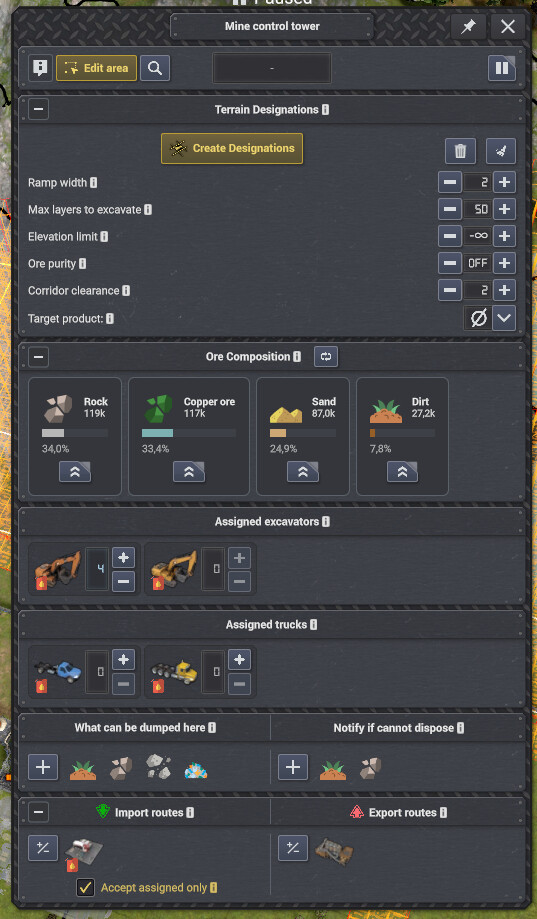
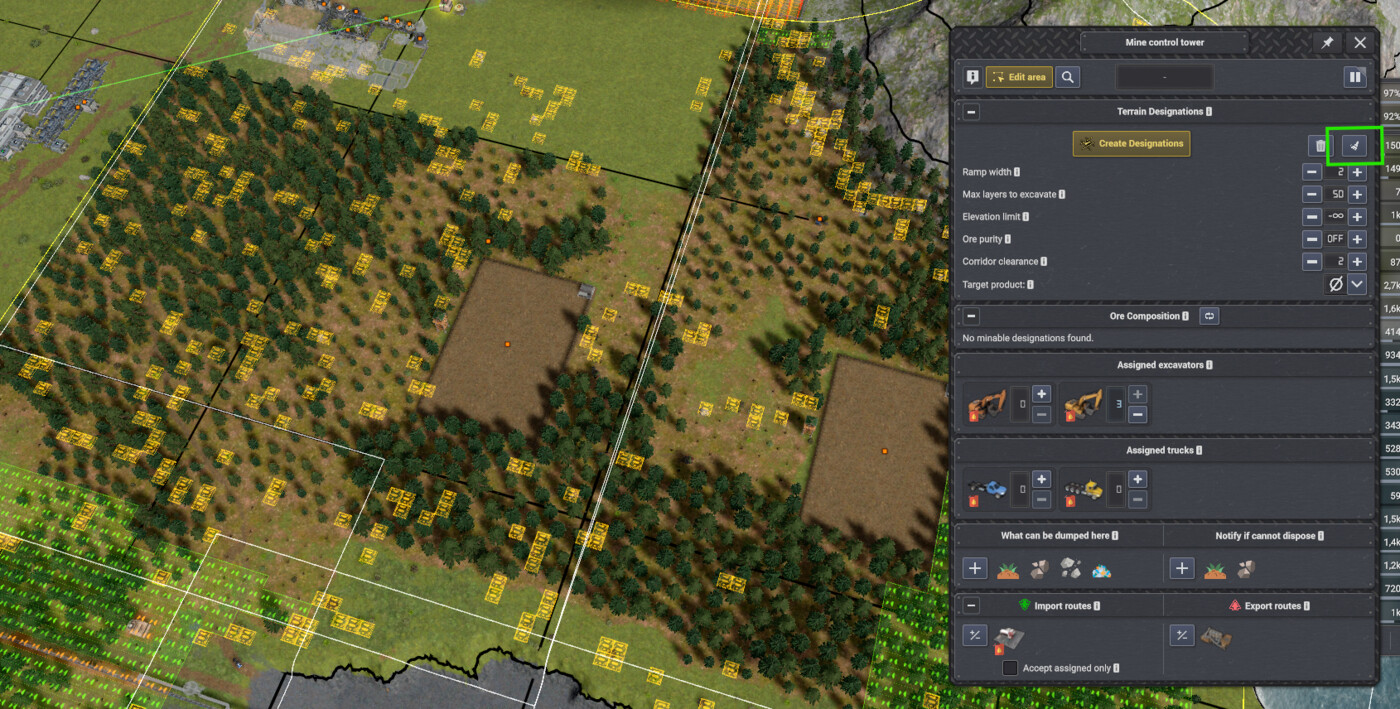
ATD's integrated Mine Tower controls, with detailed explanations available in tooltips.
Choose a product or use AUTO, then scan the tower area and create a tailored mining plan with one click. Per-tower controls cover ore quality, excavation depth, elevation limits, corridor clearance, dumping priority, and accessway mode.
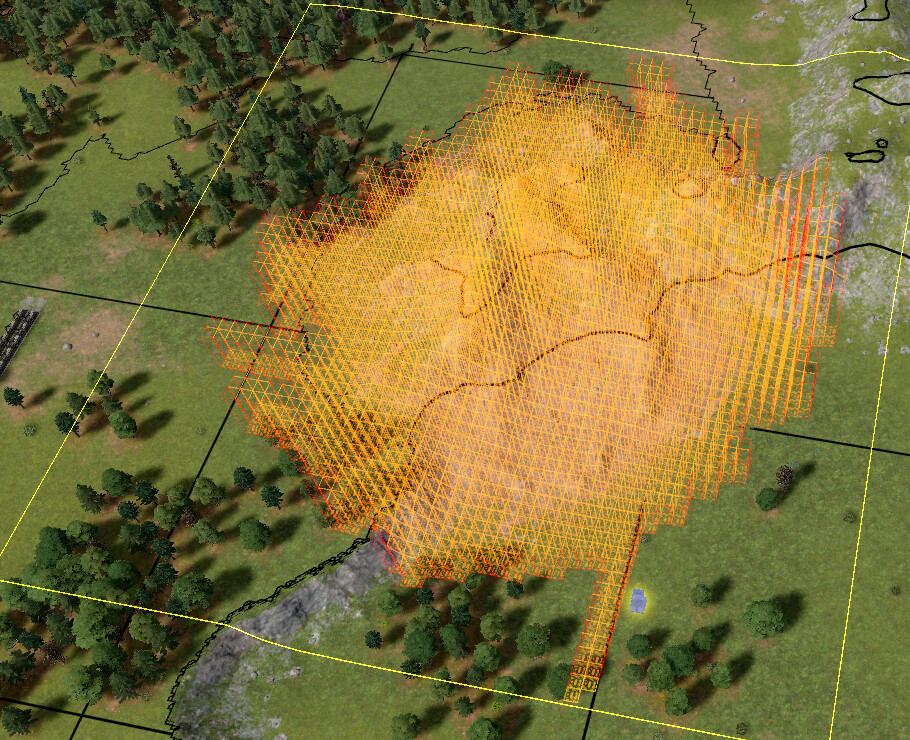
An entire deposit designated through a single click.
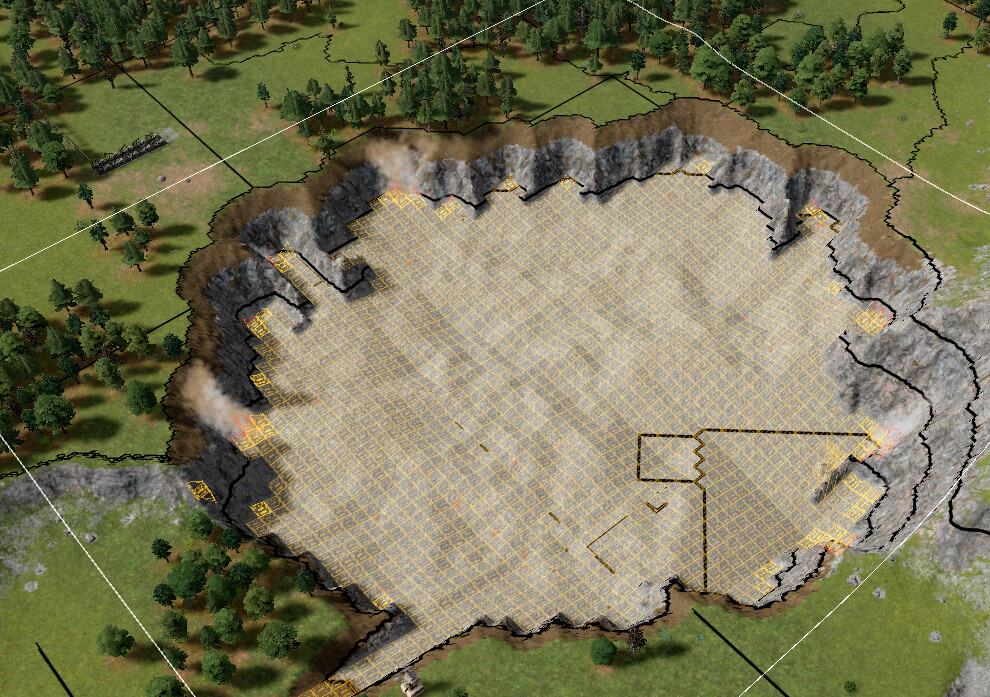
The completed excavation follows the deposit with minimal unnecessary digging.
🛣️ Routed accessways
A routed accessway connecting isolated terrain work to ground the assigned excavators can reach.
ATD can generate turning accessways sized for T1, T2, or T3/Mega Excavators. AUTO selects a suitable clearance from assigned or available excavators, while explicit modes give you direct control. Legacy straight ramps remain available when preferred.
🧹 Clear designations
The Clear control removes this tower's ATD-generated work, with Shift available for a wider area cleanup.
Use Clear designations to remove the selected tower's ATD-generated terrain and tree-harvest designations. Shift-click clears all terrain designations in the tower area while still limiting generated tree-harvest cleanup to that tower.
📊 Ore composition
Live ore composition estimates for the terrain designations currently managed by the Mine Tower.
The Ore composition panel estimates the products contained in the tower's current mining and leveling designations. It reflects the current Ore Mining Yield difficulty setting and works with both ATD-generated and manually placed designations.
🎯 Mining and dumping priorities
Tower-level product and dumping priorities keep excavation and material delivery focused where you want them.
Set a preferred mining product once at the tower level and ATD applies it to assigned excavators. Dumping can remain Passive or use vanilla-style active priorities from 1 to 15; farmland topsoil filling is activated automatically when required.
🏗️ Vehicle ordering
Order and pre-assign excavators or trucks directly from the Mine Tower inspector.
Order vehicle construction from the tower's vehicle assignment UI. ATD selects the closest eligible Vehicle Depot, records the pre-assignment, and sends the completed vehicle to the tower automatically. Shift and Ctrl modifiers order 5 or 10 vehicles; Shift+Alt-click orders directly even when a free vehicle is available.
🚚 Idle vehicle management
Per-tower idle policies keep vehicles nearby, park them normally, or release them for work elsewhere.
Idle Excavators can be released and automatically recalled when excavation resumes. Trucks offer three policies: Park at tower, Stay put, and Soft release, allowing each Mine Tower to balance responsiveness against fleet sharing.
🪨 Clear debris
The Clear debris control queues reachable rocks, bushes, and other obstructions for excavator removal.
Request removal of reachable debris in the tower area without spending Unity on Quick remove. ATD temporarily works around conflicting terrain designations and restores them after cleanup. Ctrl-click also includes debris that is not currently reachable.
📐 Corner designations
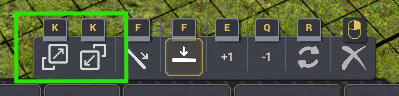
Outer, inner, and planar corner tools integrated into the terrain-designation toolbar.
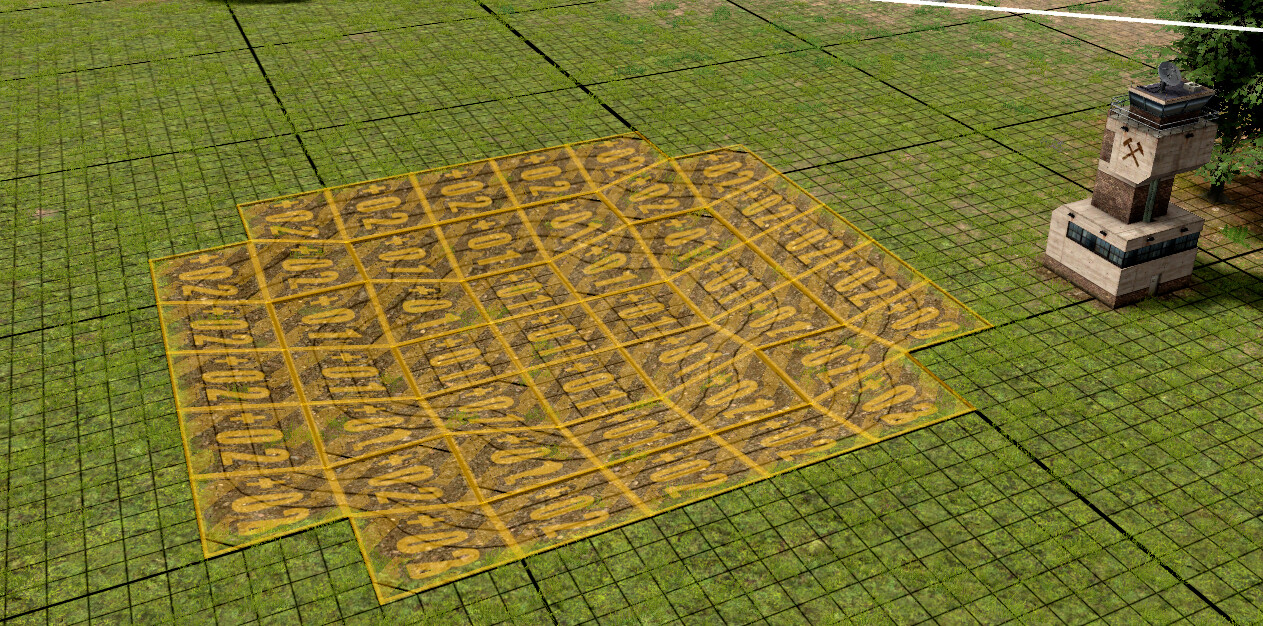
Manual corner designations create smooth, connected surfaces in 3D.
Place outer, inner, and planar corner profiles with four rotations using mining, dumping, or leveling designations. The tools support preview, drag placement, and keyboard cycling for fast terrain shaping.
🌾 Farmland preparation
Farmland preparation automatically excavates, fills, and reconnects a level area with fertile material.
Turn flat leveling work into farmable ground with per-tower automation. ATD manages excavation, farmable-material filling, vehicle access, and completion; Farm Placement Assist can hold farm construction until the required terrain cells are ready.
⚙️ Additional settings
ATD's Mod Settings tabs provide worldwide behavior, reusable defaults, and optional expert controls.
Open ATD in the Mod Settings window for controls that are not available directly from an individual Mine Tower:
- Terrain safety — Choose how cautiously ATD predicts landslides and keeps generated work away from oceans and buildings.
- Ramps outside tower areas — Allow a bounded retry just beyond the tower boundary when no valid in-area accessway can be found.
- Debris and tree handling — Control disrupted-tree harvesting, terrain changes used to remove debris, and when accessway cleanup may spend Unity on Quick remove.
- Notifications — Enable or disable excavator-completion and accessway warning notifications.
- Tower panel defaults — Choose whether the Mining Designations, Ore Composition, and Farmland Preparation panels start collapsed.
- Mine Tower defaults — Set the initial accessway mode, dumping priority, excavation depth, elevation limit, ore quality, and idle-vehicle behavior, then optionally save them as the configuration for new games.
For mining connoisseurs who enjoy tuning the last grain of ore, ATD also exposes expert ore-quality thresholds and accessway pathfinder controls. Most players can safely leave these at their defaults.
Mine away!
PS. Leave a 👍 or a ⭐️ if you found this mod useful.
🌱 Kayser's Automatic Terrain Designations v0.4.1
🌱 Kayser's Automatic Terrain Designations v0.4.1
Less of a Mess
This is a follow-up release for v0.4.0's farmland preparation automation, focused on making it smoother, faster, and a lot less fussy around awkward terrain.
The short version: farmland preparation is more robust, access ramps are smarter, large jobs should be noticeably lighter, and there are a few new quality-of-life controls for keybindings, notifications, and vehicle assignment.
🚜 Farmland Preparation Improvements
Farmland preparation now handles more of the strange edge cases that show up when you ask a mine tower to turn rough terrain into nice respectable farm plots.
The biggest changes are around access and edges:
- access ramps can now be created for multiple inaccessible farming clusters in the same tick
- reachability can propagate through adjacent farming designations that share matching-height edges, reducing unnecessary extra ramps
- final filling and rim alignment now use dumping designations instead of leveling designations, ignoring debris
- completed final farming designations are removed immediately after the completion notification, so they do not interfere with nearby follow-up farming patches
- exposed corners now get diagonal preparation shoulders when both adjacent cardinal shoulders exist, avoiding issues with dirt falling off in corners
- diagonal corner rim alignment designations now close fill-area corners more cleanly
This should make elevated and coastal farming projects behave better, especially around shoulders, rims, and follow-up patches.
🧩 Mod Interoperability
v0.4.1 has been extensively tested with Moriarty's GamePlay++ to make sure farmland preparation interoperates cleanly during real farming workflows. Video: https://streamable.com/iju6z1
⚡ Faster Large Farming Sessions
Large farmland jobs should be noticeably less expensive to run.
Ramp generation now probes perimeter tiles instead of scanning deep into every possible interior tile, which can reduce candidate work by roughly 7x for large areas. Ramp reachability checks are also cached during placement attempts and capped so pathological cases do not spiral into long stalls.
Farming automation itself also does less repeated work:
- access/pathability rechecks are throttled for large active sessions
- pending fill-area tile sets are cached and rebuilt only when the farming state changes
- large auto-reactivated sessions should produce less background overhead after loading a save
🛣️ Better Access Ramp Behavior
Ramp placement now checks whether vehicles can actually reach the ramp before committing to a candidate. Accessible candidates are preferred; if no accessible candidate exists, ATD still places the best available option and reports that clearly.
Ramp generation also evaluates all four cardinal directions now. The old half-space direction restriction has been removed, while scoring still prefers ramps aligned toward the tower. This gives ATD useful fallback routes when the obvious direction is blocked by terrain, buildings, or water.
Ramp warnings are now shown only as vanilla-style notifications on the mine tower:
- failed ramp generation
- truncated ramp placement
- ramp placed but not currently accessible
If you prefer quieter automation, these warnings can be disabled globally with rampNotificationsEnabled in ATDsettings.json or:
atd_set_ramp_notifications on|off
🚚 Auto-Release Idle Vehicles
The Terrain Designations inspector now has an Auto-release when idle toggle.
When enabled for a tower, ATD will temporarily unassign excavators and trucks while no mining or leveling work is pending, then automatically reassign them when work resumes. This is useful for farmland automation that switches between mining and dumping, or for towers that only occasionally need attention and otherwise tie up vehicles.
The global default is:
autoReleaseVehiclesWhenIdle
It can also be changed with:
atd_set_auto_release_vehicles_when_idle
For debugging and vehicle bookkeeping, v0.4.1 also adds:
atd_get_assigned_vehicles
This lists mine towers, assigned vehicles, per-vehicle job state, ATD's auto-release setting, and which vehicles ATD has released.
⌨️ Corner Mode Settings
Corner designation mode is now more configurable:
- corner rotation now uses the player's mapped rotate key instead of always using R
- the corner mode key can be changed with the new
cornerDesignationKeysetting - the default is still K
You can edit ATDsettings.json directly or use:
atd_set_corner_designation_key
The command accepts Unity KeyCode names, such as Alpha1 or F1.
🌐 Translations and UI Polish
This release includes revised Swedish, German, and Russian translations, with terminology aligned more closely to the base game.
Portuguese translation has also been added.
Some panel wording has been cleaned up:
- Mining designations
- Ore quality
- Ore composition
- Farmland preparation
The Farmland Preparation panel can now start collapsed by default using:
farmingPanelCollapsed
or:
atd_set_farming_panel_collapsed on|off
📦 Compatibility
As before, ATD is compatible with vanilla saves and can be added to or removed from existing saves safely.
Settings should migrate automatically. Existing changed settings are preserved, and new settings are added with their defaults.
Thanks again to everyone testing farmland automation in the wild. v0.4.1 is very much a "make the big new thing behave better under pressure" release, and your edge cases are what make that possible.
No More Dirt-y Work!
🌱 Kayser's Automatic Terrain Designations v0.4.0
This one is a pretty big quality-of-life release for anyone who likes making mines, farms, and terrain projects without hand-painting every little bit of dirt.
🚜 New: Farmland Preparation Automation
No more dirt-y work!
ATD can now help prepare farmable ground from flat level designations inside a mine tower area.
Draw your flat level designations, select the mine tower, open the new Farmland Preparation panel, and enable Farmland Preparation Automation. ATD will:
- temporarily dig unsuitable top material one layer lower where needed
- restore the original level designations for final filling
- restrict the tower's dump rules during filling so trucks use farmable material like dirt/compost
- restore the tower's dump rules when the work is done
- add temporary access ramps when excavators or trucks cannot reach the work area
- clear vehicles out of the fill area before committing final fill orders
- add support shoulders near exposed drops/ocean edges to reduce dirt spill-off
It also keeps running in the background after you close the inspector. On load, it can automatically re-enable for towers that were already doing farmland work.
🔔 Vanilla-Style Notifications
v0.4.0 adds ATD notifications that behave much more like normal CoI notifications:
- ✅ Farming complete: green one-time notification when preparation and filling are done
- 👷 Excavator complete: clickable green one-time notification when a vehicle depot finishes building an excavator, so you can send it to work immediately
- ⚠️ Ramp warnings: translated warning text for failed or incomplete access ramps
Excavator completion notifications can be toggled with:
atd_set_excavator_completion_notifications
🌐 Translations
ATD now has localization support for the main panels, tooltips, status text, and related notifications.
Included languages:
- English
- Swedish
- German
- Russian
This covers Terrain Designations, Farmland Preparation, Ore Composition, and the new notification messages.
ATD will also load any additional language file added under translations/, so community translations can be dropped in without needing a new mod build.
📋 Quick Farming Start
- Draw flat level designations inside a mine tower area.
- Select the mine tower.
- Open Farmland Preparation.
- Enable Farmland Preparation Automation.
- Let the tower crews do the ugly dirt work.
Only flat level designations participate. Corner/sloped designations are ignored by the farming automation.
Important: with the default settings, when this version loads a save, any mine tower that contains only flat leveling designations may be treated as farmland work and start Farmland Preparation Automation automatically. If you use flat level designations for non-farming projects, check those towers after loading or turn off reEnableFarmingOnLoad.
📦 Compatibility
As before, ATD is compatible with vanilla saves and can be added to or removed from existing saves safely.
Any changed settings in ATDsettings.json should migrate.
Thanks to everyone testing, reporting edge cases, and pushing this mod into weirder terrain projects than I would ever have found on my own. Have fun turning questionable rock fields into respectable farmland.
AutoTerrainDesignations v0.3.0 — Manual Corner Designations
AutoTerrainDesignations v0.3.0 — Manual Corner Designations
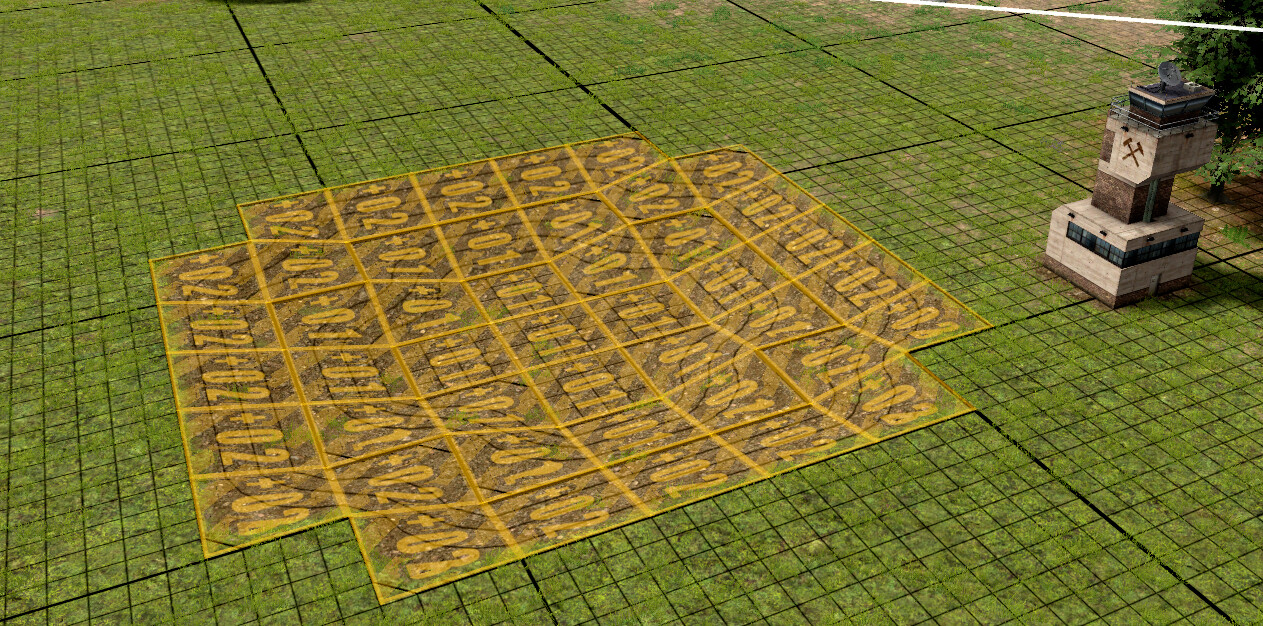
Corner designations — the special diagonal-slope tiles that were previously only available through generated designations — can now be placed manually.
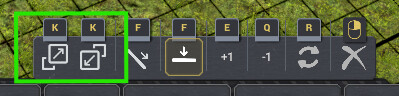
Corner placement mode is available from within any terrain designation tool (Mining M, Dumping Z, Leveling N). Enter it via the new ▲/▽ toolbar buttons or by pressing K when within one of the terrain designations tools.
What you can do
🔲 Choose the corner type. Outer (convex) and inner (concave) corners each have a dedicated toolbar button. Press K to flip between them.
🔄 Rotate the orientation. Press R to rotate the unique corner clockwise (NW → SW → SE → NE), so you can face the slope in any direction.
↕️ Set height with Q/E. The height offset from the active tool carries through into corner mode, so the placed slope lands exactly where you intend.
🧲 Snap to existing designations automatically. When you hover over a tile adjacent to an existing designation, corner mode reads the neighbour's height and variant and matches them — both edge-sharing and diagonal neighbours are considered. Vanilla designations snap to corner designations the same way, so you can seamlessly extend from placed corner designations.
⛏️ Place a diagonal slope in one drag. Hold and drag a rectangle. The area fills with a checkerboard of outer (▲) and inner (▽) corners that interlock into a continuous diagonal slope — no tile-by-tile placement required.
🔧 Works with all three designation tools. The placed corners use whichever tool is active — Mining, Dumping, or Leveling.
New Feature: Remove Debris
Auto Terrain Designations v0.2.3
This patch adds experimental Remove Debris support.
You can now designate blocking debris in a mine tower area for mining/removal with a dedicated sweep button. (Auto mode can also fall back to debris removal when no useful product is found, before targeting dirt.)
The debris action avoids digging into the ground and overwriting existing terrain designations, while still allowing debris in forested areas to be marked for removal.
v0.6.1
Latest- Game version
- 0.8.5 - 0.8.7a
- Released
- Aug 18, 2026
- File size
- 1.3 MB
- License
- MIT
* Added: Per-tower and world dumping priority controls with vanilla active priorities 1–15 and a Passive mode that imports only from active exporters; farmland topsoil still uses active dumping during filling
* Changed: The default dumping priority is now Passive. Existing towers retain their stored priority; a stored value of 15 now means active low priority, so choose Passive to retain the previous passive behavior
* Fixed: Interactive accessway searches now invalidate when accessway mode, ramp width, world access policy, tower ownership, or tower area changes, preventing stale routes from being committed
* Improved: Accessway planning now captures terrain and building state before preparation so route validation remains consistent with the world state used to start the search
v0.6.0
- Game version
- 0.8.5 - 0.8.7a
- Released
- Aug 16, 2026
- File size
- 1.3 MB
- License
- MIT
* Improved: Mine Tower copy, blueprint, repeated placement, eligible Cut, and Copy settings workflows now preserve the tower's exact managed area and ATD mining settings, including ore selection and quality, mining priority, accessway clearance, and vehicle idle policies, while retaining vanilla vehicle-assignment behavior
* Added: Farmland preparation filling can request farmable soil from eligible storages, including neutral storages that are not configured as exporters
* Improved: Interactive Create Designations accessway generation now uses the same cooperative manager as existing-terrain repair and planned mining-tower access, with request-scoped cancellation and progress diagnostics
* Improved: ATD console setter commands now report their current values when invoked without changing settings
* Changed: Routed turning ramps are now the default accessway generator for AUTO and T1-T3, while legacy straight ramps remain available as an explicit fallback option
* Fixed: Farmland preparation automation now reconnects persisted sessions to their live mine towers after loading a save
v0.5.12
- Game version
- 0.8.5 - 0.8.7
- Released
- Aug 11, 2026
- File size
- 1.3 MB
- License
- MIT
* Added: Idle truck behavior options for mine towers: Park at tower (the vanilla default), Stay put (the new default, which keeps trucks assigned near their last work area without unnecessary return trips), and Soft release
* Added: Migration for the previous automatic truck-release setting and per-tower state
* Changed: Soft release now also applies while a tower is paused or has no active excavator capacity, and reassigns trucks when excavation work resumes
* Improved: Mine tower idle vehicle tooltips now show clickable cards for soft-released trucks and excavators
v0.5.11
- Game version
- 0.8.5 - 0.8.7
- Released
- Aug 09, 2026
- File size
- 1.3 MB
- License
- MIT
* Improved: Large farming accessway searches now run cooperatively in small slices, keeping the game responsive while access is being planned
* Changed: Access progress toasts now show the current phase and progress details for interactive and managed searches, with a Hide control that suppresses the toast without cancelling the active request
* Fixed: Farming accessways can now finish through existing provider networks and reuse served provider work without creating unnecessary duplicate routes
* Improved: Existing provider network preparation is faster, reducing pauses before accessway searches begin
* Fixed: Right Alt keybindings no longer capture the keyboard layout's synthetic Ctrl and AltGr aliases
* Fixed: Updating ATD no longer disables experimental accessways that were already enabled.
v0.5.10
- Game version
- 0.8.5 - 0.8.7
- Released
- Aug 08, 2026
- File size
- 1.3 MB
- License
- MIT
* Added: Manual Planar corner designations with four rotations, preview and drag support, and a dedicated toolbar button
* Changed: Corner designation toolbar buttons and K cycling now follow the Outer, Inner, Planar order, and the Planar button uses a dedicated diagonal-plane icon
v0.5.9
- Game version
- 0.8.5 - 0.8.7
- Released
- Aug 08, 2026
- File size
- 1.3 MB
- License
- MIT
* Improved: Farming access searches now validate live tower, settings, and designation changes before continuing, bound their pending queue, and retain detailed cancellation diagnostics
* Fixed: Farming-generated accessway leveling cells remain accessway work instead of being reinterpreted as new farmland-preparation intents
* Fixed: Multiple inaccessible farming clusters are processed sequentially and can reuse pending projected accessways instead of creating unnecessary separate ramps
* Fixed: Directly replacing an ATD-generated terrain designation transfers ownership to the player's replacement so later farming cleanup leaves it intact
* Fixed: Holding Left Alt while adding a tower vehicle now checks availability in the default logistics zone, matching the vanilla assignment override
* Fixed: Added missing translations for the Allow ramps outside tower areas world-setting label
v0.5.8
- Game version
- 0.8.5 - 0.8.6c
- Released
- Aug 04, 2026
- File size
- 1.3 MB
- License
- MIT
* Fixed: Farming access searches no longer synchronously monopolize a simulation tick, preventing severe freezes during large farmland preparation jobs
* Fixed: Repeated farming access failures now use a bounded retry window instead of immediately repeating the same search
* Improved: Farming access searches now show their preparation or filling progress, can be stopped by the player, and use additional CPU capacity while the game is paused
* Improved: Farming access generation now reuses compatible unfinished accessway work and avoids competing with interactive accessway searches
* Fixed: Accessway designations committed while paused remain correctly owned by farming automation through save, disable, and phase transitions
* Fixed: Manually removed or replaced farming accessway designations are no longer deleted by a later farming cleanup
* Fixed: V2 accessway routing validates generated terrain and existing designations more reliably around T3 accessway transitions
v0.5.7
- Game version
- 0.8.5 - 0.8.6c
- Released
- Aug 02, 2026
- File size
- 1.3 MB
- License
- MIT
* Fixed: ATD notification messages now refresh after the selected mod translation is applied, including excavator completion notifications
* Changed: Removed queued debris-cleanup notifications; removal designations now provide progress feedback
* Fixed: Shift-Alt-clicking a tower vehicle-order button no longer enqueues both a pre-assigned truck and a second free truck
* Improved: Added an enabled-by-default setting that allows access ramps outside tower areas when an in-area search cannot find a feasible route
* Improved: Added independent controls for access-search diagnostics and a command to clear all diagnostic overlays
* Fixed: V2 accessway pathfinding no longer rejects valid routes around generated terrain, clearance boundaries, and same-operation landscaping rays
* Fixed: Clear designations now cancels pending accessway Quick remove requests and removes their temporary previews
v0.5.6
- Game version
- 0.8.5 - 0.8.6c
- Released
- Aug 01, 2026
- File size
- 1.2 MB
- License
- MIT
* Improved: While paused, prop removal advances pending cleanup far enough to show temporary terrain designations
* Changed: Pending Quick remove requests display a temporary mining preview when unassigned, spending Unity only after unpausing
* Improved: Existing player or pathfinder designations at Quick remove origins remain in place as visual markers
* Improved: Experimental T3 accessways connect directly to jagged and slanted terrain-designation fringes with corner-capable transition bands
* Improved: Vehicle depot completion notifications trigger only for unassigned (free) excavators and specify the completed excavator model
* Fixed: Manually clearing or replacing an ATD-owned terrain designation releases tower ownership and marks designation generation dirty
v0.5.5
- Game version
- 0.8.5 - 0.8.6b
- Released
- Jul 28, 2026
- File size
- 1.2 MB
- License
- MIT
* Fixed: Vehicle assigner row visibility when starting a new game where vehicle technology is not yet unlocked but starting vehicles are owned
* Improved: Completed language entries for Accessways settings and mine control tower vehicle status summary
* Improved: Updated Russian translation with reviewed community localization
v0.6.1 | 2026-08-18
* Added: Per-tower and world dumping priority controls with vanilla active priorities 1–15 and a Passive mode that imports only from active exporters; farmland topsoil still uses active dumping during filling
* Changed: The default dumping priority is now Passive. Existing towers retain their stored priority; a stored value of 15 now means active low priority, so choose Passive to retain the previous passive behavior
* Fixed: Interactive accessway searches now invalidate when accessway mode, ramp width, world access policy, tower ownership, or tower area changes, preventing stale routes from being committed
* Improved: Accessway planning now captures terrain and building state before preparation so route validation remains consistent with the world state used to start the search
v0.6.0 | 2026-08-16
* Improved: Mine Tower copy, blueprint, repeated placement, eligible Cut, and Copy settings workflows now preserve the tower's exact managed area and ATD mining settings, including ore selection and quality, mining priority, accessway clearance, and vehicle idle policies, while retaining vanilla vehicle-assignment behavior
* Added: Farmland preparation filling can request farmable soil from eligible storages, including neutral storages that are not configured as exporters
* Improved: Interactive Create Designations accessway generation now uses the same cooperative manager as existing-terrain repair and planned mining-tower access, with request-scoped cancellation and progress diagnostics
* Improved: ATD console setter commands now report their current values when invoked without changing settings
* Changed: Routed turning ramps are now the default accessway generator for AUTO and T1-T3, while legacy straight ramps remain available as an explicit fallback option
* Fixed: Farmland preparation automation now reconnects persisted sessions to their live mine towers after loading a save
v0.5.12 | 2026-08-11
* Added: Idle truck behavior options for mine towers: Park at tower (the vanilla default), Stay put (the new default, which keeps trucks assigned near their last work area without unnecessary return trips), and Soft release
* Added: Migration for the previous automatic truck-release setting and per-tower state
* Changed: Soft release now also applies while a tower is paused or has no active excavator capacity, and reassigns trucks when excavation work resumes
* Improved: Mine tower idle vehicle tooltips now show clickable cards for soft-released trucks and excavators
v0.5.11 | 2026-08-09
* Improved: Large farming accessway searches now run cooperatively in small slices, keeping the game responsive while access is being planned
* Changed: Access progress toasts now show the current phase and progress details for interactive and managed searches, with a Hide control that suppresses the toast without cancelling the active request
* Fixed: Farming accessways can now finish through existing provider networks and reuse served provider work without creating unnecessary duplicate routes
* Improved: Existing provider network preparation is faster, reducing pauses before accessway searches begin
* Fixed: Right Alt keybindings no longer capture the keyboard layout's synthetic Ctrl and AltGr aliases
* Fixed: Updating ATD no longer disables experimental accessways that were already enabled.
v0.5.10 | 2026-08-08
* Added: Manual Planar corner designations with four rotations, preview and drag support, and a dedicated toolbar button
* Changed: Corner designation toolbar buttons and K cycling now follow the Outer, Inner, Planar order, and the Planar button uses a dedicated diagonal-plane icon
v0.5.9 | 2026-08-08
* Improved: Farming access searches now validate live tower, settings, and designation changes before continuing, bound their pending queue, and retain detailed cancellation diagnostics
* Fixed: Farming-generated accessway leveling cells remain accessway work instead of being reinterpreted as new farmland-preparation intents
* Fixed: Multiple inaccessible farming clusters are processed sequentially and can reuse pending projected accessways instead of creating unnecessary separate ramps
* Fixed: Directly replacing an ATD-generated terrain designation transfers ownership to the player's replacement so later farming cleanup leaves it intact
* Fixed: Holding Left Alt while adding a tower vehicle now checks availability in the default logistics zone, matching the vanilla assignment override
* Fixed: Added missing translations for the Allow ramps outside tower areas world-setting label
v0.5.8 | 2026-08-04
* Fixed: Farming access searches no longer synchronously monopolize a simulation tick, preventing severe freezes during large farmland preparation jobs
* Fixed: Repeated farming access failures now use a bounded retry window instead of immediately repeating the same search
* Improved: Farming access searches now show their preparation or filling progress, can be stopped by the player, and use additional CPU capacity while the game is paused
* Improved: Farming access generation now reuses compatible unfinished accessway work and avoids competing with interactive accessway searches
* Fixed: Accessway designations committed while paused remain correctly owned by farming automation through save, disable, and phase transitions
* Fixed: Manually removed or replaced farming accessway designations are no longer deleted by a later farming cleanup
* Fixed: V2 accessway routing validates generated terrain and existing designations more reliably around T3 accessway transitions
v0.5.7 | 2026-08-02
* Fixed: ATD notification messages now refresh after the selected mod translation is applied, including excavator completion notifications
* Changed: Removed queued debris-cleanup notifications; removal designations now provide progress feedback
* Fixed: Shift-Alt-clicking a tower vehicle-order button no longer enqueues both a pre-assigned truck and a second free truck
* Improved: Added an enabled-by-default setting that allows access ramps outside tower areas when an in-area search cannot find a feasible route
* Improved: Added independent controls for access-search diagnostics and a command to clear all diagnostic overlays
* Fixed: V2 accessway pathfinding no longer rejects valid routes around generated terrain, clearance boundaries, and same-operation landscaping rays
* Fixed: Clear designations now cancels pending accessway Quick remove requests and removes their temporary previews
v0.5.6 | 2026-08-01
* Improved: While paused, prop removal advances pending cleanup far enough to show temporary terrain designations
* Changed: Pending Quick remove requests display a temporary mining preview when unassigned, spending Unity only after unpausing
* Improved: Existing player or pathfinder designations at Quick remove origins remain in place as visual markers
* Improved: Experimental T3 accessways connect directly to jagged and slanted terrain-designation fringes with corner-capable transition bands
* Improved: Vehicle depot completion notifications trigger only for unassigned (free) excavators and specify the completed excavator model
* Fixed: Manually clearing or replacing an ATD-owned terrain designation releases tower ownership and marks designation generation dirty
v0.5.5 | 2026-07-28
* Fixed: Vehicle assigner row visibility when starting a new game where vehicle technology is not yet unlocked but starting vehicles are owned
* Improved: Completed language entries for Accessways settings and mine control tower vehicle status summary
* Improved: Updated Russian translation with reviewed community localization
v0.5.4 | 2026-07-27
* Fixed: Deleted mine control towers now properly reset farmland work in progress
* Changed: Adjusted Safety policy slope and buffer presets for improved terrain clearance, with default slope factor 0.9 and buffer 2 tiles
* Improved: Added documentation comments for all expert access search settings in ATDsettings.json
v0.5.3 | 2026-07-27
* Fixed: Restored vehicle pre-allocation UI controls for excavators and trucks, including custom vehicle subclasses and non-tower assignment panels
* Fixed: Mine tower vehicle ordering hint tooltip now shows full Shift-Alt-click shortcut details when hovered
v0.5.2 | 2026-07-20
* Changed: V2 turns are now orientation-only transitions over flat 2x2 landings, suppressing flat and strafe successors.
* Changed: Adjusted default access height envelope allowances for V1 and V2 accessways.
* Fixed: Restricted vehicle pre-allocation UI patches to MineTower entities only, resolving the truck assignment issue on Tree Harvesters.
v0.5.1 | 2026-07-19
* Changed: Vehicle construction confirmations now use the same enqueue-for-tower wording, button text, and depot zoom tooltip as AutoForestryDesignations
* Fixed: Ramps starting from mining designations now correctly reserve local space for flat landings and turns
* Fixed: Prevented invalid ramp connections on large flat ground areas
v0.5.0 | 2026-07-18
* Added: Experimental two-tile-wide accessways (ramps, etc.) for Mega vehicles, including turns, switchbacks, and connections between terrain work and the tower access network
* Changed: **Accessway mode** replaces the previous ramp-width and corridor-clearance settings, with OFF, AUTO, T1, T2, T3, and legacy straight-only modes
* Improved: Mining designations and accessways use landslide prediction to better avoid buildings and protected ocean tiles
* Improved: Accessways can join usable natural terrain and reuse existing planned routes, reducing unnecessary terrain work
* Improved: Accessway routing considers mining, dumping, and leveling endpoints, balancing landscaping work against travel distance
* Added: A **Safety policy** setting with presets from MIN to MAX for landslide slope and buffer limits
* Improved: Accessways validate full vehicle clearance and use safer transitions to natural terrain and existing designations
* Added: AUTO accessways can connect to an unstarted mine control tower ghost without creating or modifying the ghost
* Added: **Quick remove debris** accessway policy with Always, Restrictive, and Never options
* Added: Trees disrupted by mining designations or accessways are automatically marked for harvesting
* Added: **Clear debris** now queues safe excavator cleanup for selected props, including while paused, and reports when no reachable debris is available
* Improved: Debris cleanup temporarily preserves existing terrain and forestry designations, then restores them after cleanup
* Fixed: Repeated **Create Designations** clicks do nothing until relevant tower settings, terrain, or world conditions change
* Changed: **Ore quality** now uses a five-position slider from Off through Max
* Changed: **Ore: None** ignores debris and dirt when existing pathfinding designations are present; its previous behavior is unchanged otherwise
* Changed: Corner designation mode is now configured in vanilla **Controls**, with existing custom bindings retained
* Added: An optional bottom-left cursor-coordinate overlay, disabled by default
* Updated: Settings labels, icons, and translations
* Changed: Minimum supported Captain of Industry version is now 0.8.5; older versions may still work but are unsupported and untested
v0.4.5a | 2026-06-21
* Improved: Experimental turning accessways connect to uneven ground using vanilla mining and dumping workability rules, with the correct designation type on the final tile
* Fixed: Turning accessways can crest onto usable ground instead of unnecessarily continuing close to the surface
* Fixed: Ground reachability is now traced from the actual mine tower, including towers outside their managed area
* Fixed: Experimental routes no longer revisit earlier corridor tiles or travel below the minimum ocean height
* Improved: Safer landslide checks account for active designations and building foundations for both mining and dumping routes
* Improved: A* is now the default experimental search, with substantially faster difficult-route searches and reduced repeated snapshot work
* Fixed: Large mine tower areas no longer trigger designation-area clamping or omit existing designations from accessway analysis
v0.4.4 | 2026-06-20
* Added: Experimental turning and switchback accessways (least-work corridor pathfinding) for mine towers, enabled by default (only active when the tower's **Ramp Width** setting is set to 1)
* Changed: Changed default starting **Ramp Width** default setting for new mine towers from 2 to 1 so the new experimental turning and switchback pathfinding is active by default
* Changed: Renamed the Mod Settings **Mining defaults** heading to **Mine control tower defaults** to match the vanilla tower name
* Changed: Split **Auto-release when idle** into separate per-tower and global toggles for excavators and trucks
* Fixed: Auto-release now treats paused mine towers as idle, so vehicles are released while the tower is paused and restored when work resumes
* Added: Compact assigned and released vehicle lists in the Farmland preparation panel tooltips
* Fixed: Ramp generation skipping incorrectly due to unrelated reachable accessways in the tower area
* Fixed: Vehicle auto-release could leave vehicles stuck assigned to invisible or deconstructed mine towers after saving and restarting
* Updated: German, Spanish, Italian, Portuguese, Russian, Swedish, and Chinese translations
v0.4.3 | 2026-06-06
* Added AutoHelpers shared **Mod Settings** tabs for ATD global defaults, game settings, and ore-quality thresholds, with localized labels/tooltips and shared-window tab icons
* Added: Chinese translation
* Changed: Farm Placement Assist now captures and replays the entire intercepted placement batch when a farm in the batch needs terrain preparation, so mixed farm blueprints stay atomic and non-farm blueprint pieces are not dropped or placed early
* Added limited config-backed save/load recovery for pending Farm Placement Assist batches; pending farms retain proto, transform, reflection, crop schedule, and fertility target, but full blueprint/entity configuration persistence is not implemented yet
* Fixed: Farm Placement Assist replayed intercepted placements with crop assignments, recipe selections, port configurations, and reflection lost; the original placement intent now stores the full entity configuration and replays it through the original batch command so blueprint-configured state is preserved
* Added **bottomFlatteningStrength** global setting (1-10, default 5) to control the depth percentile used as the flattening target during the bottom-flattening pass; configurable via `ATDsettings.json` or **atd_set_bottom_flattening_strength**
* Changed: farming access ramps to back-row farmland clusters now lay flat 1-cell bridges at the neighboring cluster's target height instead of wedging back up to surface
v0.4.2 | 2026-05-29
* Added: per-tower settings (max height diff, ramp width, max layers, max depth, ore quality, corridor clearance, auto-release, ore filter, mining priority, farmland preparation automation state) and the collapsed state of each tower's **Mining designations**, **Ore composition**, and **Farmland preparation** panels are now persisted into the vanilla save file via a `config.json` state blob; settings survive save/load cycles without any custom save format
* Added three debug console commands: **atd_dump_pending_save_json**, **atd_dump_last_loaded_json**, **atd_dump_panel_state**
v0.4.1 | 2026-05-21
* Fixed: corner designation rotation now responds to the player's mapped rotate key instead of always responding to R
* Added **cornerDesignationKey** global setting: the key used to enter and toggle corner designation mode; configurable via **ATDsettings.json** (default: **K**) or the new **atd_set_corner_designation_key** console command (accepts any Unity KeyCode name, e.g. Alpha1, F1)
* Added **Auto-release when idle** toggle in the **Terrain Designations** inspector: when enabled for a tower, all excavators and trucks are unassigned while no mining or leveling work is pending and re-assigned automatically when work resumes
- Global default is **autoReleaseVehiclesWhenIdle** in ATDsettings.json (default: false); the per-tower toggle overrides this default
- Added **atd_set_auto_release_vehicles_when_idle** to set the global default; **AutoReleaseWhenIdle** is included in **atd_get_settings** output
* Added **atd_get_assigned_vehicles** console command: lists every mine tower with its assigned vehicles, per-vehicle job state, ATD auto-release setting, and which vehicles ATD has released
* Added **rampNotificationsEnabled** global setting: suppresses ramp access warning notifications (Failed, Truncated, NotAccessible) on all towers; toggle in **ATDsettings.json** or with **atd_set_ramp_notifications on|off**
* Added **farmingPanelCollapsed** global setting: the **Farmland Preparation** inspector panel starts collapsed by default; toggle in **ATDsettings.json** or with **atd_set_farming_panel_collapsed on|off**
* Added diagonal corner preparation shoulders: when both adjacent cardinal shoulder ramps are present, a corner shoulder is placed at the diagonal with 3 outer corners at z-2 and the inner corner at z-1
* Added diagonal corner rim alignment designations: when both adjacent cardinal rim designations are in place, a corner rim closes the fill area corner
* Farming access ramp generation is substantially faster for large sessions
- Candidate collection now only probes perimeter ore tiles, reducing generation work by roughly 7x for large areas
- BFS reachability results are cached within a placement attempt; checks are capped at 50 per attempt
* Farming automation overhead reduced for large auto-reactivated sessions: access/pathability rechecks are throttled; pending fill-area tile sets are cached and rebuilt only on state changes
* Access ramps for multiple inaccessible farming clusters are now placed in the same tick instead of one per tick
* Ramp placement now checks vehicle accessibility before committing a candidate; accessible candidates are preferred; if none exist, the best available is placed and reported via notification
* Ramp generation now evaluates all four cardinal directions; the half-space direction restriction is removed; scoring still ranks by alignment toward the tower, so off-axis directions serve as fallbacks when the preferred corridor is blocked
* Ramp outcome warnings (Failed, Truncated, NotAccessible) are now shown as vanilla notifications on the mine tower; the warning icon has been removed from the **Terrain Designations** panel
* Changed: final farmland filling and rim alignment now use dumping designations instead of leveling designations; filling completion uses dump fulfillment
* Changed: farming completion removes completed final origin designations immediately after the completion notification, preventing them from disturbing adjacent follow-up farming patches
* Changed: inaccessible-designation detection propagates reachability through adjacent farming designations that share a matching-height edge, reducing the number of clusters that require a dedicated access ramp
* Changed: rim alignment placement criteria — cardinal rims require both far corners of the rim tile to be within +-0.1 of target height; diagonal corner rims require all 3 far corners to pass
* Changed: UI panel labels updated — mining panel is **Mining designations**, ore filtering preset is **Ore quality**, panel headings use sentence case (**Ore composition**, **Farmland preparation**); settings keys and console command names are unchanged
* Changed: farming session status messages (e.g. from **atd_farming_dump_all_towers**) are no longer localized and always display in English; inspector panel labels and tooltips are unaffected
* Revised Swedish, German, and Russian translations — terminology aligned with base game wording and reviewed for accuracy across all panels, tooltips, and status messages
* Fixed: German translation of the ore mining priority tooltip
* Added: Portuguese translation
v0.4.0 | 2026-05-14
* Added farmland preparation automation for mine towers
- Enabled via the **Farmland Preparation Automation** checkbox in the **Farmland Preparation** inspector panel
- Automatically re-enables on load for towers that were running preparation work; toggle with **reEnableFarmingOnLoad** in **ATDsettings.json** or **atd_set_re_enable_farming_on_load** / **atd_re_enable_farming_on_load**
- Clears out vehicles from the fill area before committing final fill designations to reduce the chance of vehicles getting trapped
- Adds temporary sloped support shoulders on exposed sides near steep drops or ocean edges to reduce dirt spill-off during final filling
- Added a green one-time completion notification when preparation and filling are done
- Detailed per-tower diagnostics available via **atd_farming_dump_all_towers**
* Added localization support for the **Terrain Designations**, **Farmland Preparation**, and **Ore Composition** panels and related tooltips and status text
- Includes English, Swedish, German, and Russian translations under **translations/**
* Added a green one-time notification when any vehicle depot completes an excavator; toggle with **excavatorCompletionNotifications** in **ATDsettings.json** or **atd_set_excavator_completion_notifications**
* Changed the excavator completion notification to use the mining toolbar icon
* Improved **ATDsettings.json** migration so defaults from older releases are upgraded to current defaults while user-changed values are preserved
v0.3.1 | 2026-05-09
* Ramp generation warnings now shown as a yellow icon next to the **Create Designations** button (tooltip contains the message):
- "Ramp generation failed — no valid path found."
- "Ramp placed but did not reach the surface — excavators may not be able to excavate."
- "Couldn't find a valid path from the tower to the generated ramp. Check for access problems."
* Increased generated ramp safety margin around nearby buildings by 1 tile. Landslide can still reach buildings if built on deep dirt/sand.
* Added a bottom-flattening pass to reduce rough/bumpy excavation floors; designations floor should now be noticeably flatter. Can be toggled on/off with **atd_set_bottom_flattening on/off**.
* Tuned default **Low** and **Med** ore purity thresholds to reduce the jump from **Off**; existing **ATDsettings.json** values are preserved. Added **atd_reset_to_defaults** to try built-in defaults in memory.
* Renamed the **Target product** label to **Scanning filter** to avoid confusion with mining priority.
v0.3.0 | 2026-05-08
* Corner designations can now be placed manually from within any terrain designation tool (**M**, **Z**, **N**) — use the new **▲**/**▽** toolbar buttons or press **K** (**K** again flips between outer/inner); supports height offset (**Q**/**E**), rotation (**R**), and auto-snap to neighbouring designations; vanilla designations also snap to corner designations
- Corner mode exits automatically when chosing one of the vanilla modes (flat/ramp) or the designation tool is deactivated
* Better quality thumbnail
v0.2.4 | 2026-05-04
* Settings file renamed from **settings.json** to **ATDsettings.json** to avoid conflicts with other mods
* Existing **settings.json** files are still read as a legacy fallback and migrated into the generated **ATDsettings.json** format
* **ATDsettings.json** is no longer distributed inside the mod ZIP — it is generated automatically in the mod folder on first run, populated with the current defaults and inline documentation
* Settings file now contains a **settingsVersion** stamp; when the mod version advances the file is automatically migrated (user values are preserved and any new keys are added)
* Added **atd_save_settings** console command to write the current in-memory global defaults back to **ATDsettings.json** at any time
* Added global defaults for whether the Terrain Designations and Ore Composition panels start expanded or collapsed, configurable via **ATDsettings.json** or console commands.
* Fixed Corridor clearance modifier-click handling so Shift/Ctrl jumps directly between Off and 2 instead of requiring multiple clicks.
v0.2.3 | 2026-05-03
* Added experimental Remove Debris scan support, available as a dedicated action and as an auto fallback when no useful product is found.
v0.2.2 | 2026-05-03
* Added concise license and attribution notices to source files and README.
v0.2.1 | 2026-05-03
* Added the mod marker/version tooltip to both inspector panels.
* Made the Ore Composition panel explicitly collapsible again while keeping it open by default.
* Added horizontal scrolling to Ore Composition cards so towers with many ore products no longer overflow the inspector column.
* Fixed the Ore Composition panel so it can populate for custom IAreaManagingTower implementations; excavator priority controls remain limited to vanilla mine towers.
* Fixed clearing terrain designations so it only removes mining designations and preserves other designation types such as forestry. Placing mining designations will still overwrite other designations.
v0.2.0 | 2026-05-01
* Changed project license to MIT and added a repository LICENSE file.
* Added short MIT/SPDX license annotations to source files.
v0.1.15 | 2026-05-01
* Fixed incorrect trimming of poor ore near the bottom of the designation.
* Changed the label Override product to Target product to make it clearer.
* Added a per-tower Corridor clearance setting for separated ore components and passability.
* Added in-game console commands for live tuning of all ATD global defaults.
* Updated the API with initialization checks, per-tower settings accessors, panel builder methods, and ramp-width driven designation creation.
v0.1.14 | 2026-05-01
* Improved designation logic to reduce the risk of vehicles getting stuck.
* Connectivity now uses 2-tile-wide designation corridors for mega-vehicle passability.
* Enclosed interior holes inside designation regions are now automatically filled.
* Single-tile pinch points inherited from the ore scan are now widened.
v0.1.13 | 2026-05-01
* Fixed an issue with settings.json not parsing in some locales.
v0.1.12 | 2026-05-01
* Tower settings are now persistent throughout a session.
* Excavator priority is now a sticky state per tower and can be reset to None.
* Ore Purity OFF is now more aggressive when sweeping up ore.
* Externalized global default parameters to settings.json.
* Fixed an invalid settings.json path issue.
v0.1.11 | 2026-05-01
* The Ore Composition panel now refreshes automatically after creating designations.
* Terrain Designations panel is now collapsible.
* Added the Ore Purity Level preset setting and externalized its thresholds to settings.json.
* Ramp generation now tries to avoid all buildings.
v0.1.10 | 2026-05-01
* Improved ramp generation with selectable ramp width, better z-level targeting, better attachment to designation edges, and tower avoidance.
* Added buttons on ore composition cards to set mining priority for all tower excavators.
* Overhauled the UI with a more prominent Create Designations button and visually tuned ore composition cards.
v0.1.9 | 2026-05-01
* Fixed broken non-tower inspectors.
* Fixed stale Ore Composition data after switching inspectors.
* Made the Ore Composition panel always visible and replaced auto-refresh with a manual scan button.
* Ore Composition panel now clears when switching to a different tower inspector.
v0.1.8 | 2026-05-01
* Ore Composition panel now refreshes correctly when switching tower inspectors.
* Ore Composition now counts only material above the designation target level.
* Dumping designations are excluded from the Ore Composition scan.
* Redesigned Ore Composition cards with proportional color-coded progress bars and percentage shares.
v0.1.7 | 2026-05-01
* Added the Ore Composition panel for the mine tower inspector.
* Ore Composition quantities reflect the current Ore Mining Yield difficulty setting.
* Ore Composition panel refreshes automatically when designations change.
* Fixed a mod package extraction issue on Linux.
v0.1.6 | 2026-05-01
* Added Max layers to excavate and Max depth settings.
* Clearing designations is now instantaneous regardless of area size.
* Bedrock is now always excluded from terrain scans.
* Added the AutoTerrainDesignationsApi integration API.
v0.1.5 | 2026-05-01
* Adjusted max slope to 1 to prevent dead spots.
v0.1.4 | 2026-05-01
* Moved UI controls to their own panel for better compatibility and robustness.
* Updated the placement algorithm to reduce the risk of excavators getting stuck.
v0.1.3 | 2026-05-01
* Fixed UI collision by changing from text-based buttons to icon-based buttons.
* Added scanning for any mineable product through the product selector.
* Improved scanning, particularly along deposit edges.
* Added thumbnail.
v0.1.0 | 2026-05-01
* Initial release.
This mod has no dependencies.
No other mods depend on this mod yet.