
Kayser's Automatic Forestry Designations
v0.4.0Create forestry designations with one click. See forestry information. Order new vehicles from tower. Pool trucks on tower level.
- Source code
- https://github.com/Kayser1444/CoI_AutoForestryDesignations
- Websites
- https://discord.com/channels/803508556325584926/1500411065492832357 https://foresty-planner-pal.lovable.app/
- Tags
- Quality of Life Tweaks UI
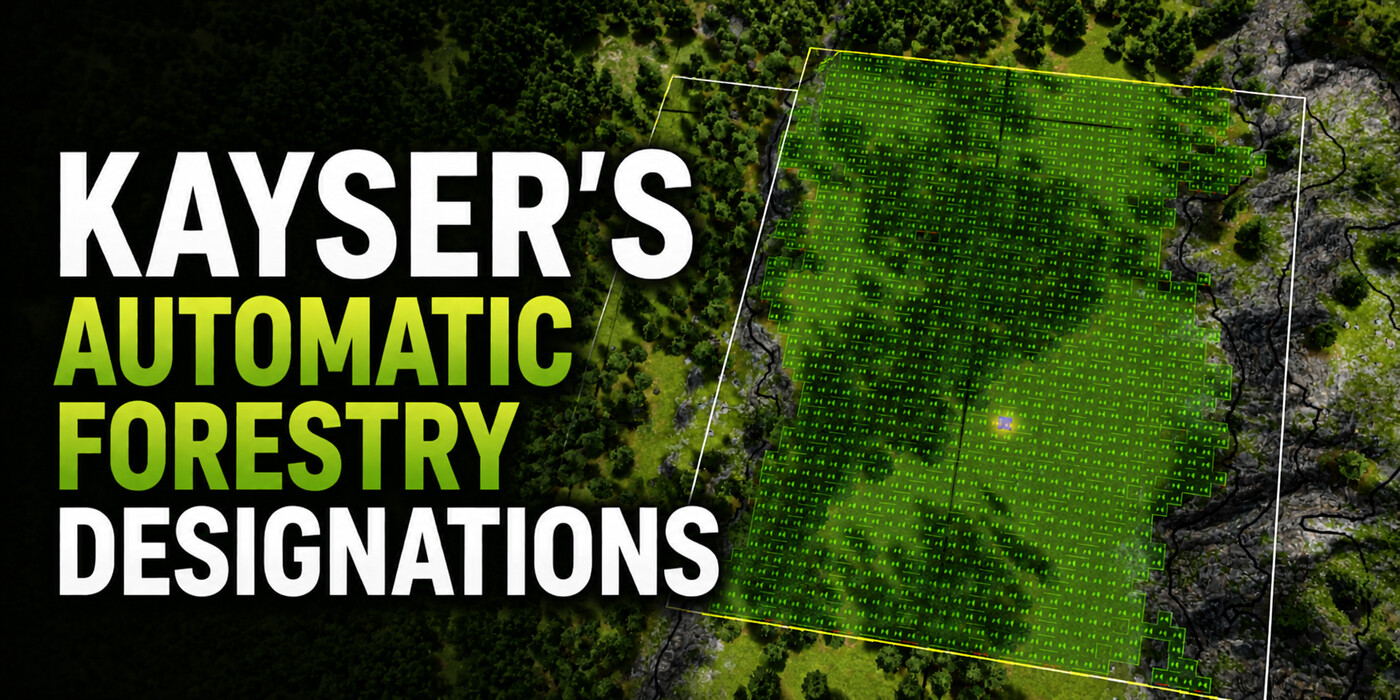
🌲 Automatic Forestry Designations
Forestry for Professional Captains
Overview
Kayser's Automatic Forestry Designations (AFD) automates day-to-day work around Forestry Towers. Create and clear forestry designations, inspect live tree and growth data, order vehicles, coordinate field work, and balance trucks across active Tree Harvesters.
Select a Forestry Tower and use Create designations to scan its area and fill eligible ground automatically. The integrated Forestry Information panel reports tree count, maturity, sustainable yield, and growth distribution, with interactive controls for highlighting trees and toggling harvest designations.
All tower settings are persisted in the vanilla save file. The mod can be added to or removed from games at any time. 100% open source.
For automated mining designations, see Automatic Terrain Designations.
✨ Feature List
🧭 Forestry vehicle optimizations
🌱 Create designations
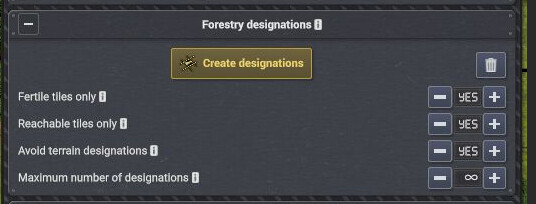
Automatic designation scanning and placement across eligible tiles in the Forestry Tower area.
Scan the selected Forestry Tower's area and place forestry designations automatically on eligible tiles. The scan respects configurable per-tower placement options:
- 🍃 Fertile tiles only — Place designations only where the ground supports tree growth.
- 🚚 Reachable tiles only — Skip candidate tiles that vehicles cannot reach.
- 🎯 Target yield — Set the desired sustainable wood production per in-game month. A scan adds eligible designations until the projected total reaches the target; ∞ means no target.
- 🗑️ Clear designations — Clear forestry designations instantly without affecting terrain designations.
📊 Forestry Information panel
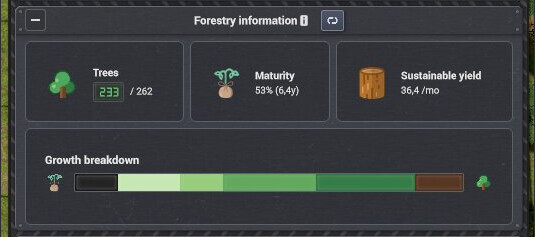
Live Forestry Information panel with tree KPIs and an interactive growth distribution chart.
Inspect real-time forestry data for the tower's assigned area:
- Trees & capacity — Live tree count versus the area's estimated maximum capacity.
- Maturity — Average tree age relative to fully grown age.
- Sustainable yield — Estimated monthly wood output for a fully planted and growing designation.
- Interactive growth distribution — A bar chart split into growth brackets. Hover to highlight matching trees in the world; click to toggle their harvest designations.
🏗️ Vehicle ordering
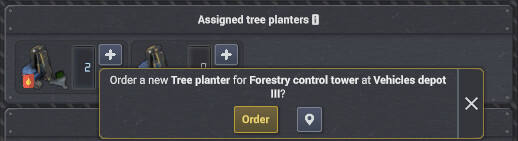
Order and pre-assign vehicles directly from the Forestry Tower inspector.
Order vehicle construction directly from the Forestry Tower's vehicle assignment UI. AFD selects the closest eligible Vehicle Depot, places the order, and highlights the ordered depot card. Once built, the vehicle automatically reports to the tower.
Shift and Ctrl modifiers let you order 5 or 10 vehicles at once. Shift+Alt-click the + button to order directly even when a free vehicle could be assigned.
🧭 Forestry vehicle optimizations
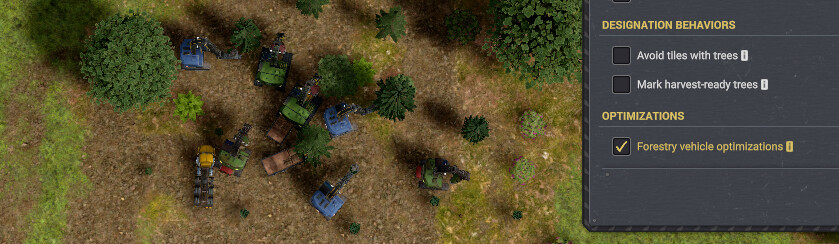
Keep assigned forestry vehicles working in the field instead of making unnecessary return trips.
Enable the default-on Forestry vehicle optimizations toggle in the world-level mod settings to coordinate Tree Planters and Tree Harvesters:
- Predictive positioning — Tree Harvesters stage near the best same-tower trees expected to reach the configured harvest threshold next.
- Planting coordination — The closest loaded, idle Tree Planter reserves the future planting spot for a Tree Harvester's target, preventing several planters from flocking to one tile.
- Field waiting — When no current or future target exists, enabled assigned vehicles stay put instead of returning to the tower.
- Vanilla work first — Active harvesting, planting, refueling, and resupply jobs always take priority over staging.
🚚 Truck pooling

Truck pooling controls in the Forestry Tower inspector.
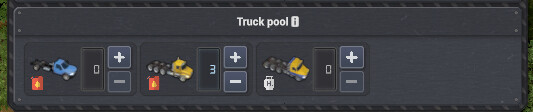
Pooled trucks balanced across the tower's active Tree Harvesters.
Enable Truck pooling to manage trucks at the tower level. Trucks assigned to the Forestry Tower are pooled and automatically distributed to active Tree Harvesters based on capacity and physical footprint. Pausing, unpausing, or changing the harvester setup dynamically rebalances allocations.
⚙️ Additional settings
[insert screenshot here]
AFD's Mod Settings tab provides world-wide behavior, tower defaults, and interface preferences.
Open the AFD tab in the Mod Settings window for controls that are not available from an individual Forestry Tower:
- Override terrain designations — Allow forestry designations to replace existing mining, dumping, or leveling designations. Disabled by default.
- Avoid tiles with trees — Skip tiles that already contain trees when creating designations.
- Mark harvest-ready trees — Automatically mark trees that meet the tower's harvest threshold after creating designations.
- Forestry vehicle optimizations — Enable or disable coordinated field waiting and predictive positioning for Tree Planters and Tree Harvesters.
- Tower panel defaults — Choose whether the Forestry Designations and Forestry Information panels start collapsed.
- Tower settings defaults — Set the initial fertility, flat-terrain, reachability, Truck pooling, and Target yield preferences, then optionally save them as the configuration for new games.
Chop away!
PS. Leave a 👍 or a ⭐️ if you found this mod useful.
New features in AFD
🌲 Automatic Forestry Designations — Vehicle Ordering & Truck Pooling
We’re excited to announce two major quality-of-life features for Kayser's Automatic Forestry Designations: Vehicle Ordering and Truck Pooling!
Together, these features transform how you manage forestry logistics, allowing you to expand your logging fleet with a single click and keep your tree harvesters working at peak efficiency without constant micro-management.
🏗️ Vehicle Ordering — Direct Construction from Towers
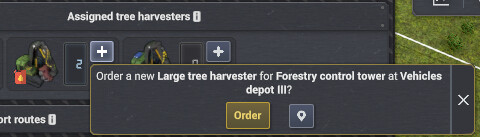
No more manually searching for an open Vehicle Depot every time your logging operation needs another tree harvester or planter!
- One-Click Ordering: Order vehicle construction directly from the Forestry Tower’s vehicle assignment section.
- Smart Depot Selection: Automatically selects the nearest eligible Vehicle Depot to build your requested vehicle.
- Pre-Assignment: Ordered vehicles are reserved for the tower during construction and automatically assign themselves the moment they roll off the assembly line.
- Depot Highlighting & Shortcuts: View enqueued vehicle progress with gold card highlights, pan directly to the building depot, or use
Shift + Alt + Clickto quickly order or cancel vehicles without confirmation prompts.
🚚 Truck Pooling — Automated Fleet Balancing
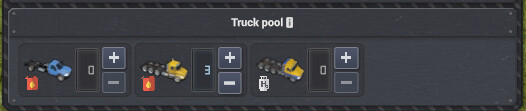
Managing vehicle assignments across individual tree harvesters in a large forestry sector can quickly become tedious. Truck Pooling centralizes vehicle management at the Forestry Tower level.
- Tower-Level Fleet Management: Assign vehicles directly to the Forestry Tower. The mod virtually pools all assigned trucks and dynamically distributes them among active tree harvesters.
- Smart Rebalancing: Allocation priority automatically favors larger harvesters and higher-capacity vehicles.
- Dynamic & Seamless: Pausing, unpausing, or modifying harvesters instantly triggers a stability-preserving rebalance without disrupting active logging work.
- Clear Harvester Feedback: Manual
+and-buttons on individual harvester inspectors work as normal, but feature amber warning tooltips reminding you that Truck Pooling is enabled and assigned trucks may be immediately redistributed by the tower. - Fully Configurable & Persistent: Toggle Truck Pooling on or off per tower or globally in Mod Settings. All settings persist seamlessly in your save file.
💾 Save Compatibility & Open Source
As with all AFD features, these additions are 100% compatible with existing saves, require no new game, and can be added or removed at any time.
Chop away!
Persistence is a virtue
🌲 Kayser's Automatic Forestry Designations v0.1.5
Persistence is a virtue!
This is a follow-up release for AFD's Forestry information panel and per-tower controls, focused on making forestry towers remember what you told them, making the tree overview easier to read, and making the growth chart actually useful while managing harvests.
The short version: per-tower settings now persist through save/load, the Forestry information panel looks more like a native CoI panel, and the growth breakdown can highlight and mark trees directly from the chart.
💾 Persistent Tower Settings
AFD now saves per-tower Forestry designations settings with the vanilla save file using CoI AutoHelpers JSON state storage. That means tower-specific options and panel states survive quit/reload.
The saved state is intentionally compact: AFD stores only values that differ from the current global defaults.
📊 Better Forestry Information Panel
The Forestry information panel has had a visual pass so it feels less like a prototype and more like part of the game:
- Cards now use a speckled panel background texture with a subtle tint to better match the game's panel style.
- The growth breakdown bar has cleaner alignment, a clearer border, and improved spacing.
- The Trees KPI now uses a live green display box that refreshes the current managed-tree count while the inspector is open.
The Trees tooltip also now makes the two numbers clearer: the first number is the live count of current managed trees, and the second is the estimated capacity based on valid planting positions.
🪓 Interactive Growth Stages
The growth distribution bar is now more than a passive chart.
Hover a growth-stage segment to highlight the corresponding trees in the world. The highlight uses a brighter tint of that segment's own colour, so the link between the chart and the actual forest is easier to read.
Click a segment to mark or unmark those highlighted trees for harvest. AFD also opens the Tree harvesting overlay so the affected trees are visible, then hides the overlay again when the inspector closes.
The segment tooltips have been cleaned up too:
- growth brackets now have names like Young, Growing, Maturing, and Fully mature
- tooltip text is split into clearer lines
- harvest-threshold wording is shorter
- hover/click instructions are localized
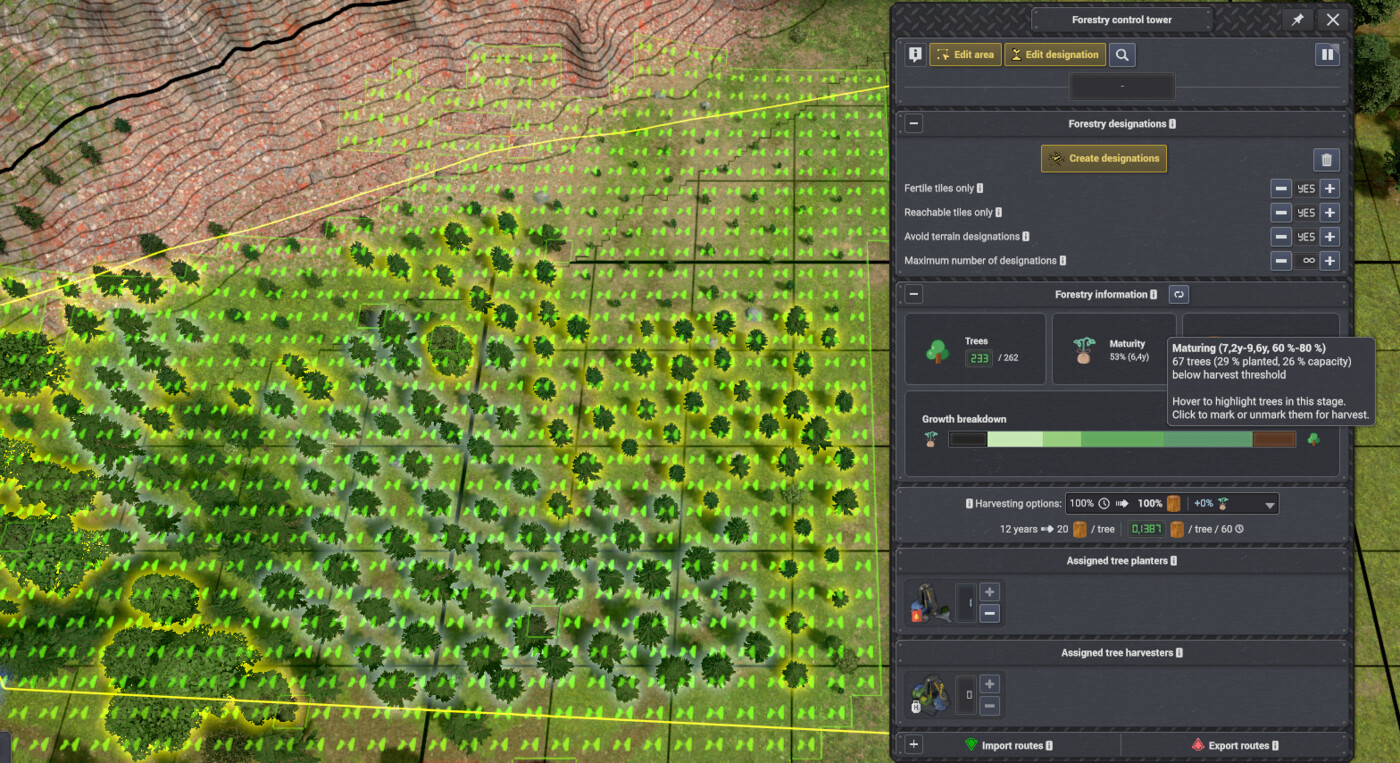
Screenshot displaying the new interactive bracket with hover highlight, click-to-designate, and cleaner tooltip.
🌐 UI Wording and Localization
Portuguese translation has been added.
Several English labels were adjusted toward vanilla-style sentence case:
- Only fertile tiles is now Fertile tiles only.
- Only reachable tiles is now Reachable tiles only.
- Max tiles is now Maximum number of designations.
Localized strings and tooltips were updated to match across the included languages.
📦 Compatibility
AFD remains compatible with existing saves and does not require starting a new game.
The new per-tower state is save-backed and stored through vanilla save data. Existing global settings continue to work as before.
Thanks to everyone testing the Forestry information panel in real saves. v0.1.5 is a "make the overview earn its place in the inspector" release: less forgetting, clearer tree data, and faster harvest decisions from the chart itself.
v0.4.0
Latest- Game version
- 0.8.5 - 0.8.7a
- Released
- Aug 18, 2026
- File size
- 1023.1 KB
- License
- MIT
* Added a world-level **Override terrain designations** setting in the **Designation behaviors** section, off by default
* Added **Target yield** planning for sustainable wood production with ∞ meaning no target
* Added **Avoid flat tiles** to preserve level ground for buildings
* Improved large scans by slicing planning work and committing completed designations through the game's safe bulk command
* Fixed: Flat, near-integer terrain is now distinguished from visibly uneven terrain using the game's surface-height tolerance
* Fixed: Large scans no longer throw collection exceptions or fill slowly from one side when reachability filtering is changed
v0.3.0
- Game version
- 0.8.5 - 0.8.7a
- Released
- Aug 14, 2026
- File size
- 1013.3 KB
- License
- MIT
* Added the default-on world-level **Forestry vehicle optimizations** toggle, keeping assigned planters and harvesters in the field and staging them for expected forestry work
* Added same-tower work coordination so active work takes priority and planters and harvesters avoid competing for the same future target
v0.2.6
- Game version
- 0.8.5 - 0.8.7
- Released
- Aug 09, 2026
- File size
- 1008.1 KB
- License
- MIT
* Added an optional world-level setting to keep loaded tree planters in the field and retry planting instead of returning to their forestry tower when no target is immediately available
* Added save persistence and `AFDsettings.json` configuration support for the loaded-planter behavior
* Simplified the AFD Mod Settings layout into one tab with grouped tower, panel, designation behavior, and optimization settings
v0.2.5
- Game version
- 0.8.5 - 0.8.7
- Released
- Aug 08, 2026
- File size
- 1005.4 KB
- License
- MIT
* Fixed: Holding Alt while assigning a vehicle from the default logistics zone now checks that zone before offering to order a new vehicle
* Updated maximum verified game version to 0.8.7
v0.2.4
- Game version
- 0.8.5 - 0.8.6c
- Released
- Aug 04, 2026
- File size
- 1005.3 KB
- License
- MIT
* Fixed: Forestry Tower vehicle-order controls no longer interfere with ATD mine-tower vehicle displays when both mods are installed
v0.2.3
- Game version
- 0.8.5 - 0.8.6c
- Released
- Aug 02, 2026
- File size
- 1005.2 KB
- License
- MIT
* Fixed: Shift-Alt-clicking a tower vehicle-order button no longer enqueues both a pre-assigned truck and a second free truck
v0.2.2
- Game version
- 0.8.5 - 0.8.6c
- Released
- Aug 01, 2026
- File size
- 1007.3 KB
- License
- MIT
* Fixed: Rebalanced pooled trucks correctly after assigning or unassigning tree harvesters, including harvesters without trucks
v0.2.1
- Game version
- 0.8.5 - 0.8.6b
- Released
- Jul 30, 2026
- File size
- 982.4 KB
- License
- MIT
* Fixed: Restored auto-adoption of harvester-assigned trucks into the virtual tower truck pool when loading save games or initializing towers
* Fixed: Resolved edge cases where truck pool assignments could be lost on game reload when using global default settings
* Fixed: Prevented unnecessary truck re-assignments between harvesters when adding extra vehicles to equal-sized harvesters
* Fixed: Corrected truck assignment eligibility check on Forestry Towers so vanilla assignment rules apply when truck pooling is disabled
* Optimized: Narrowed internal entity lifecycle event hooks for better runtime performance
v0.2.0
- Game version
- 0.8.5 - 0.8.6b
- Released
- Jul 28, 2026
- File size
- 980.8 KB
- License
- MIT
* Added: Truck Pooling feature for Forestry Towers, virtually pooling and automatically balancing assigned trucks across active tree harvesters
* Added: Truck pool section to Forestry Tower inspector displaying real-time vehicle assignments
* Added: Per-tower and global Truck Pooling settings with config persistence and Mod Settings tab toggle
* Added: Visual amber icon styling and dynamic hover note hints for harvester vehicle assignment controls when pooling is active
* Added: Capacity- and physical footprint-based truck allocation priority
* Fixed: Starting vehicle assigner row visibility when starting a new game
* Updated: Supported language localizations across all 7 supported languages
v0.1.12
- Game version
- 0.8.5 - 0.8.6b
- Released
- Jul 27, 2026
- File size
- 971.7 KB
- License
- MIT
* Added Shift-Alt-click shortcut hint to vehicle assignment tooltips
* Fixed: Restored vehicle ordering support across tree harvester and tree planter assignment controls and non-tower panels
* Fixed: Resolved vehicle allocation visibility updates when opening assignment inspector panels
* Fixed: Resolved vehicle order tooltip target and depot resolution when hovering vehicle assignment controls
* Updated maximum verified game version to 0.8.6b
v0.4.0 | 2026-08-18
* Added a world-level **Override terrain designations** setting in the **Designation behaviors** section, off by default
* Added **Target yield** planning for sustainable wood production with ∞ meaning no target
* Added **Avoid flat tiles** to preserve level ground for buildings
* Improved large scans by slicing planning work and committing completed designations through the game's safe bulk command
* Fixed: Flat, near-integer terrain is now distinguished from visibly uneven terrain using the game's surface-height tolerance
* Fixed: Large scans no longer throw collection exceptions or fill slowly from one side when reachability filtering is changed
v0.3.0 | 2026-08-14
* Added the default-on world-level **Forestry vehicle optimizations** toggle, keeping assigned planters and harvesters in the field and staging them for expected forestry work
* Added same-tower work coordination so active work takes priority and planters and harvesters avoid competing for the same future target
v0.2.6 | 2026-08-09
* Added an optional world-level setting to keep loaded tree planters in the field and retry planting instead of returning to their forestry tower when no target is immediately available
* Added save persistence and `AFDsettings.json` configuration support for the loaded-planter behavior
* Simplified the AFD Mod Settings layout into one tab with grouped tower, panel, designation behavior, and optimization settings
v0.2.5 | 2026-08-08
* Fixed: Holding Alt while assigning a vehicle from the default logistics zone now checks that zone before offering to order a new vehicle
* Updated maximum verified game version to 0.8.7
v0.2.4 | 2026-08-04
* Fixed: Forestry Tower vehicle-order controls no longer interfere with ATD mine-tower vehicle displays when both mods are installed
v0.2.3 | 2026-08-02
* Fixed: Shift-Alt-clicking a tower vehicle-order button no longer enqueues both a pre-assigned truck and a second free truck
v0.2.2 | 2026-08-01
* Fixed: Rebalanced pooled trucks correctly after assigning or unassigning tree harvesters, including harvesters without trucks
v0.2.1 | 2026-07-30
* Fixed: Restored auto-adoption of harvester-assigned trucks into the virtual tower truck pool when loading save games or initializing towers
* Fixed: Resolved edge cases where truck pool assignments could be lost on game reload when using global default settings
* Fixed: Prevented unnecessary truck re-assignments between harvesters when adding extra vehicles to equal-sized harvesters
* Fixed: Corrected truck assignment eligibility check on Forestry Towers so vanilla assignment rules apply when truck pooling is disabled
* Optimized: Narrowed internal entity lifecycle event hooks for better runtime performance
v0.2.0 | 2026-07-28
* Added: Truck Pooling feature for Forestry Towers, virtually pooling and automatically balancing assigned trucks across active tree harvesters
* Added: Truck pool section to Forestry Tower inspector displaying real-time vehicle assignments
* Added: Per-tower and global Truck Pooling settings with config persistence and Mod Settings tab toggle
* Added: Visual amber icon styling and dynamic hover note hints for harvester vehicle assignment controls when pooling is active
* Added: Capacity- and physical footprint-based truck allocation priority
* Fixed: Starting vehicle assigner row visibility when starting a new game
* Updated: Supported language localizations across all 7 supported languages
v0.1.12 | 2026-07-27
* Added Shift-Alt-click shortcut hint to vehicle assignment tooltips
* Fixed: Restored vehicle ordering support across tree harvester and tree planter assignment controls and non-tower panels
* Fixed: Resolved vehicle allocation visibility updates when opening assignment inspector panels
* Fixed: Resolved vehicle order tooltip target and depot resolution when hovering vehicle assignment controls
* Updated maximum verified game version to 0.8.6b
v0.1.11 | 2026-07-20
* Fixed: Restricted vehicle pre-allocation UI patches to ForestryTower entities only
v0.1.10 | 2026-07-19
* Added compatibility update for Captain of Industry Update 4.2 (v0.8.6)
* Changed: Minimum supported Captain of Industry version is now 0.8.5; older versions may still work but are unsupported and untested
* Fixed build script compatibility with PowerShell 5.1 / .NET Framework environments
v0.1.9 | 2026-07-15
* Improved vehicle ordering from forestry towers so it works more reliably and feels quicker when choosing a depot, and it no longer checks pathability when selecting the depot.
* Fixed issues where queued vehicle construction orders could fail to assign correctly or get out of sync after queue changes.
* Fixed the confirmation popup so vehicle orders now work correctly even when a depot already has a long build queue.
* Improved depot and assignment UI behavior for queued vehicles, including smoother interaction and better performance when viewing depot queues.
* Fixed: Release ZIP files now extract correctly on Linux
* Updated localized growth-range formatting
v0.1.8 | 2026-07-09
* Added vehicle construction enqueueing for forestry tower assignments, including closest-depot by driving distance ordering, gold border highlighting on enqueued cards, and pre-assignment tooltips in the vehicle depot UI
* Added confirmation dialog when enqueuing vehicles with camera panning to the target depot and bold entity highlights
* Added click sound on confirmation popup buttons and support for canceling enqueued orders at the closest depot via the minus button when active vehicle allocation is zero
* Added Shift+Alt+Click shortcuts to directly enqueue or cancel a single vehicle, bypassing confirmation prompts and available vehicle checks
* Added button click sound when interactive growth-stage segments are clicked in the Forestry information panel
v0.1.7 | 2026-06-08
* Fixed: Optimized tree designation checks (using `HashSet` lookup instead of linear nested loops) to eliminate tower inspector UI lag
v0.1.6 | 2026-06-06
* Added AutoHelpers shared **Mod Settings** tabs for AFD defaults, game settings, scan performance, and panel defaults, with localized labels and tooltips
* Added Chinese translation
* Fixed: release package now includes `config.json`, which is required for save-backed per-tower settings storage
* Updated latest verified game version to 0.8.5
v0.1.5 | 2026-05-24
* Added save-backed per-tower settings persistence using CoI AutoHelpers JSON state storage. Tower options and panel collapsed states now survive quit/reload and remain preserved in the save even if the mod is temporarily removed.
* Kept saved tower settings compact by storing only per-tower values that differ from the current global defaults.
* Improved the Forestry information panel visuals with speckled panel card backgrounds, better growth breakdown alignment, a clearer bordered growth bar, and more consistent bottom spacing.
* Made the Trees KPI a live green display box that refreshes the current managed-tree count while the inspector is open.
* Made growth-stage segments interactive: hover highlights the corresponding trees with a brighter tint of the segment colour, and click marks or unmarks those trees for harvest.
* Opening a growth-stage segment now activates the Tree harvesting overlay so marked trees are visible; the overlay is hidden again when the inspector closes.
* Cleaned up growth-stage tooltips with named maturity brackets, multi-line formatting, simpler harvest-threshold wording, and localized hover/click instructions.
* Refined English UI labels for vanilla-style sentence case, including **Fertile tiles only**, **Reachable tiles only**, and **Maximum number of designations**.
* Added Portuguese translation.
* Updated localized UI strings and tooltips to match the revised labels and clarify that the Trees KPI is a live count of current managed trees.
v0.1.4 | 2026-05-14
* Revised Swedish, German, and Russian translations — terminology aligned with base game wording and reviewed for accuracy across all panel labels, tooltips, and status messages
v0.1.3 | 2026-05-13
* Renamed the Forestry information KPI label from **Tree maturity** to **Maturity** to fit translations
* Fixed: The **Fertile tiles only** filter now also excludes tiles blocked by buildings or other entities
* Added experimental translation framework, including Swedish, Russian, and German translations
* Minor cosmetic corrections
v0.1.2 | 2026-05-04
* **AFDsettings.json** is no longer distributed inside the mod ZIP — it is generated automatically in the mod folder on first run, populated with the current defaults and inline documentation.
* Settings file now contains a **settingsVersion** stamp; when the mod version advances the file is automatically migrated while preserving user values.
* Added **afd_save_settings** console command to write current in-memory global defaults back to **AFDsettings.json** at any time.
* Added global defaults for whether the Forestry designations and Forestry information panels start expanded or collapsed, configurable via **AFDsettings.json** or console commands.
v0.1.1 | 2026-05-03
* Added concise license and attribution notices to source files and README.
v0.1.0 | 2026-05-03
* First public release of Kayser's Automatic Forestry Designations.
* Added Create designations and Clear designations controls directly to forestry towers.
* Automatically scans the selected tower area and places valid forestry designations on eligible 4x4 tiles.
* Clear removes only forestry designations inside the selected tower area and leaves other terrain designations alone.
* Supports per-tower placement options for fertile-only tiles, reachable tiles, existing terrain designations, max tiles per run, and harvest-ready tree marking.
* Uses vehicle pathability to prefer tiles reachable by TreePlanters and TreeHarvesters.
* Sorts designation candidates by driving distance so nearby reachable ground is filled first.
* Adds a collapsible Forestry information panel with tree count, estimated capacity, tree maturity, sustainable yield, and growth breakdown.
* Estimates tree capacity from actual plantable designation tiles instead of vanilla approximate capacity.
* Uses the tower's harvest threshold and game difficulty tree maturity settings in labels, charts, and yield estimates.
* Refreshes forestry information after creating or clearing designations and when the tower harvest threshold changes.
* Includes AFDsettings.json for startup defaults.
This mod has no dependencies.
No other mods depend on this mod yet.