
Zone Analyzer
v1.3.0Drag a box over part of your factory, or click a single conveyor or pipe, and get the production and consumption balance of every resource.
- Source code
- No source provided
- Tags
- Quality of Life UI
Zone Analyzer
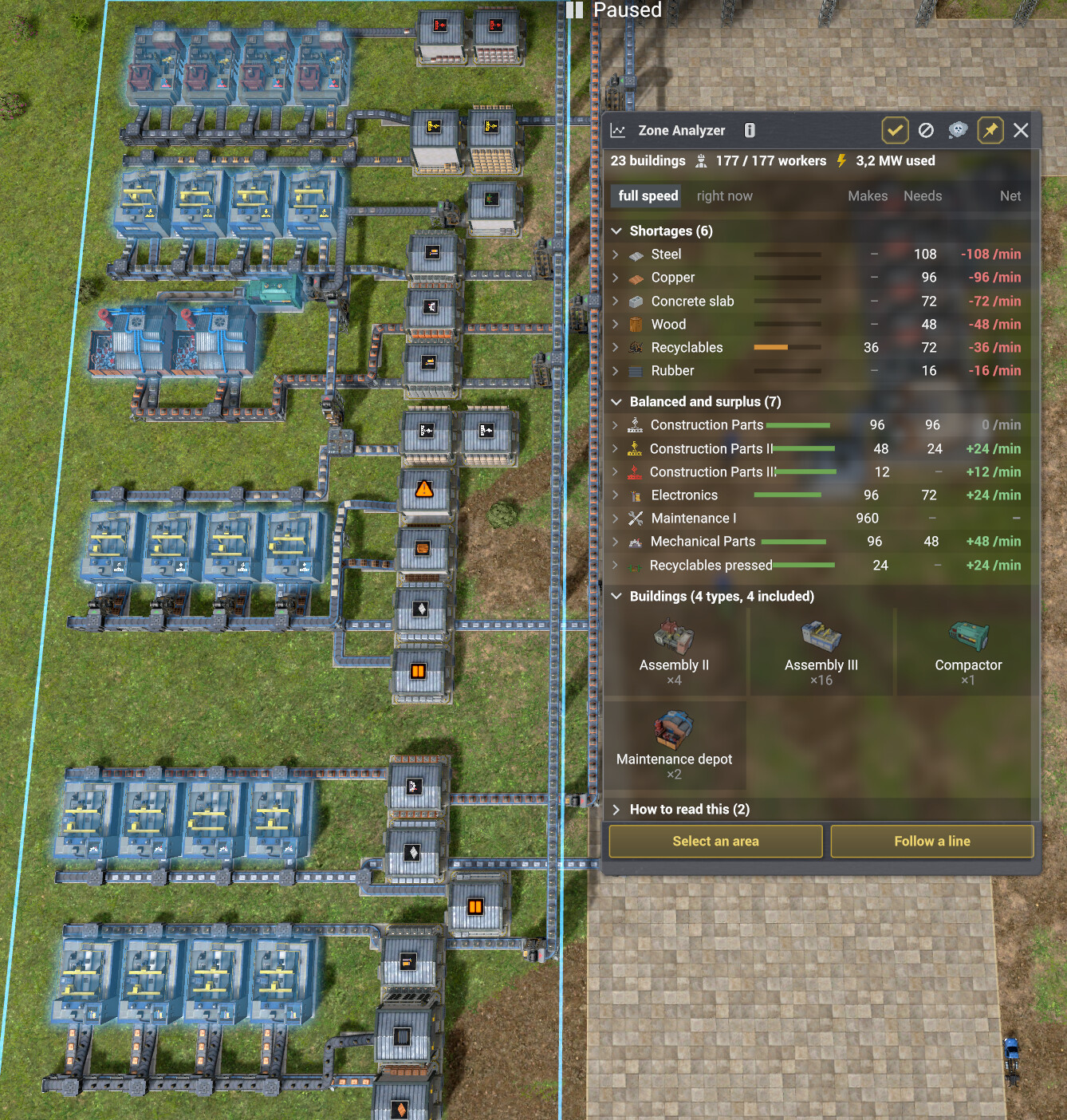
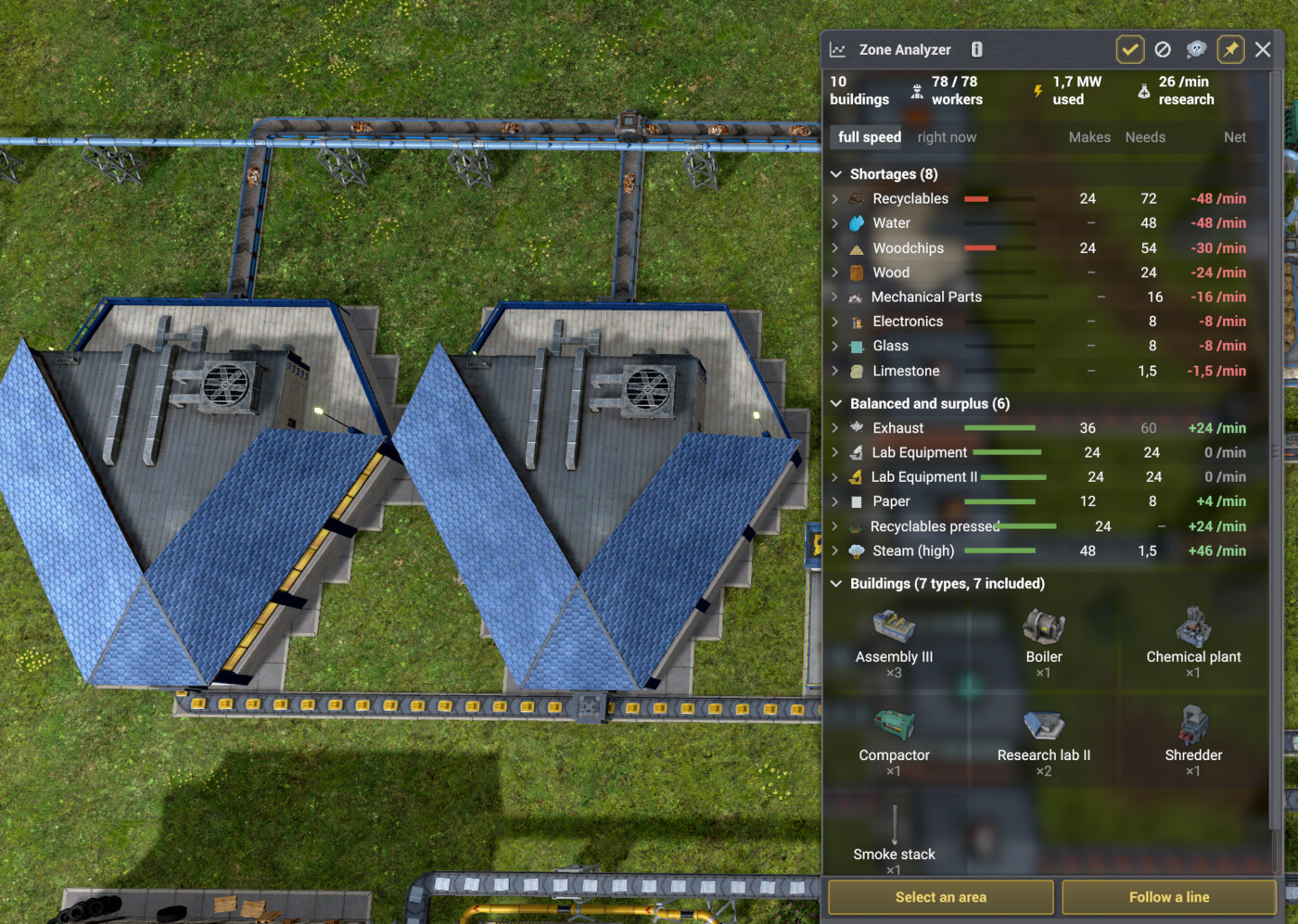
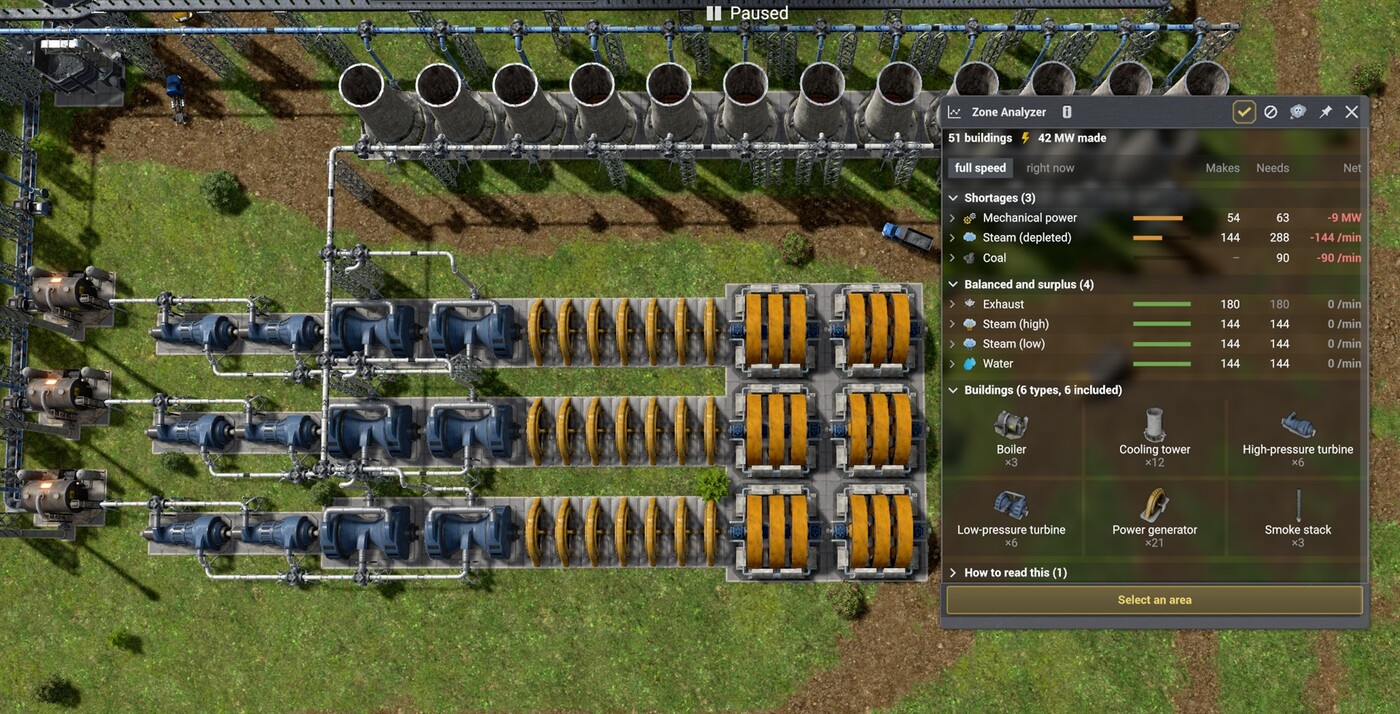
Select an area of your factory, or click a single conveyor or pipe, and instantly see, resource by resource, how much is produced, how much is needed, and whether the supply actually keeps up.
Why this mod exists
You just finished a new industrial area and you want to know whether you are feeding it enough water. A district has been running at half speed for a while and you cannot tell which of the ten things it eats is the one holding it back. Or one line feeds your whole smelting array and you suspect a forgotten low-tier segment is choking it. Draw a box, or click the line, and you get the answer.
How to use
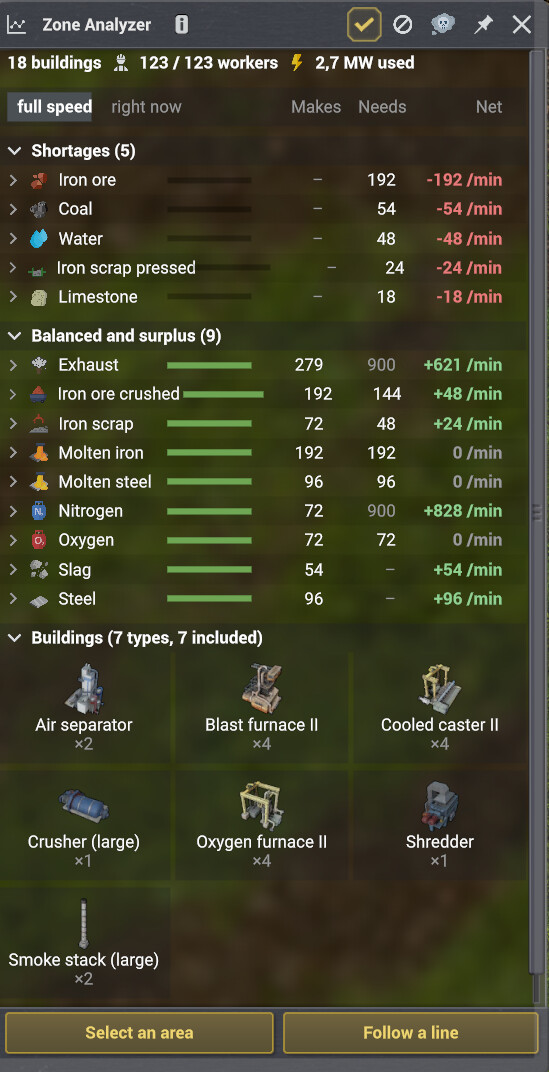
- Press F9, or click the toolbar button, to pick up the tool.
- Drag a box over any part of your base for an area balance.
- Or press "Follow a line" and click any conveyor or pipe: the mod follows everything connected to it, through storages, balancers, lifts and sorters, and shows the balance of that line
What you get
- Produced and consumed per minute, both at full capacity and as currently measured.
- The net balance, so a shortage is obvious at a glance.
- How much has to come in from outside the selected area.
- Which buildings are actually starved of a given resource, based on the time they spend waiting for it.
- Workers employed by the area: those assigned right now, and the total it asks for.
- Electricity drawn and produced side by side, so you can tell whether an area powers itself.
- Mechanical power in MW, comparing what your turbines make against what your generators need..
Follow a Line
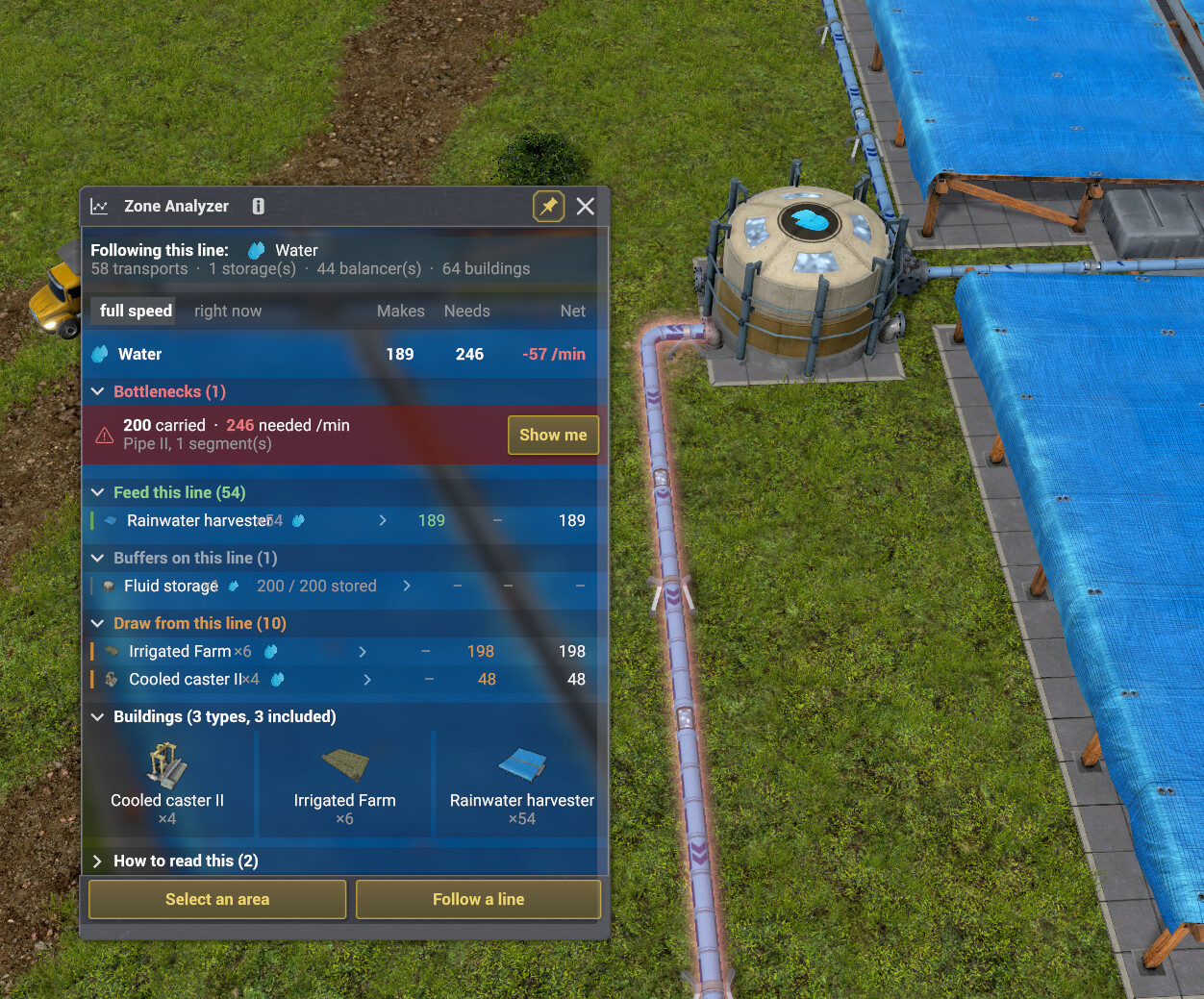
Click a belt or pipe and the panel shows who feeds that line against who draws from it, product by product. The click picks the flow: on a network split by sorters, only the products that can actually travel through the clicked transport are counted, filters and belt directions respected. Bottlenecks are detected by comparing each segment's capacity, a game datum, with what the buildings behind it need at full speed. They are highlighted in red on the map, and every row of the panel can pan the camera to its building.
Pick what counts
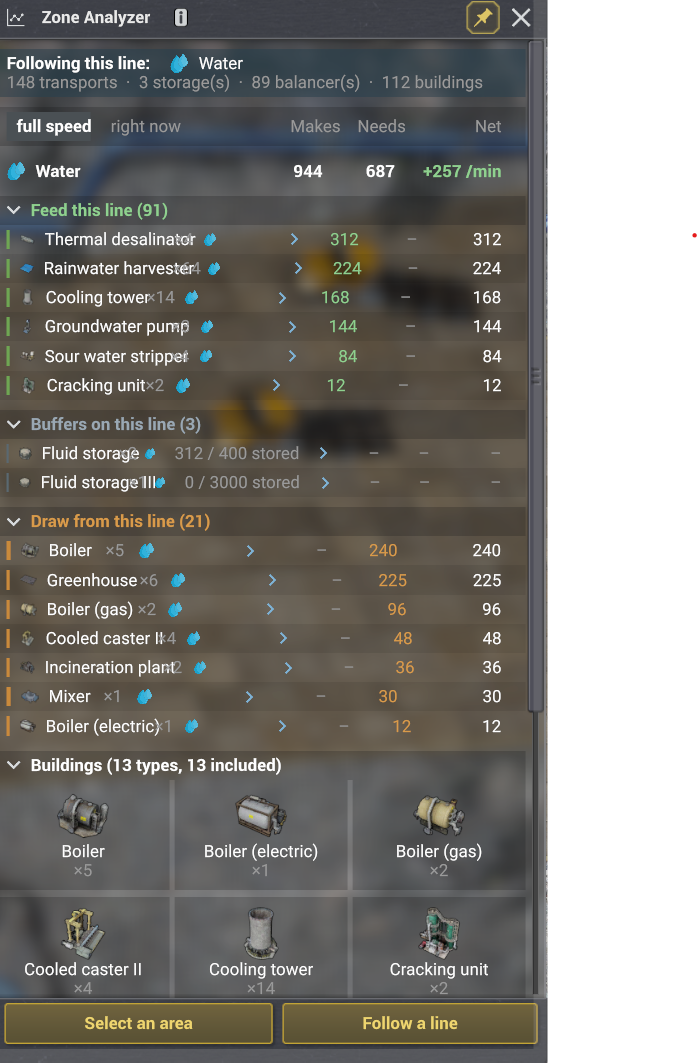
Every type of building in the selection is listed as a tile. Click one to leave it out and the balance updates at once, which makes it easy to read a single part of a dense factory.
Honest numbers
An information button explains where each figure comes from. Buildings the mod cannot measure are named rather than quietly dropped, and anything that is a capacity rather than a measurement is labelled as such. A storage that only trucks can fill shows its stock instead of a made-up rate, parallel branches are not judged for bottlenecks yet, and the panel says so.
Speaks your language
English, French, German, Spanish, Italian, Portuguese (BR), Dutch, Polish, Czech, Russian and Ukrainian.
Planned
Settlements are not counted yet. They draw water and food through a system of their own, separate from machine recipes, so covering them properly needs its own work. That is the next thing on the list.
If a number looks wrong
Some buildings are easier to read than others, and a few are left out entirely because the game keeps no usable figure for them. If something does not match what you see in your own base, tell me in the comments. I would rather fix it than have you second-guess the panel.
This mod only reads the game state and shows a panel. It stores nothing in your save file and can be added or removed at any time.
About the filesystem warning
The mod reads one thing: its own translations folder, to load the language file matching your game. It writes nothing to disk. Window position and width are stored through the game's own settings, not in files.
1.1.0 is out: Pipeline and Conveyor Analysis, Bottleneck detection and UI
1.1.0 is out.
Click any conveyor or pipe with the new "Follow a line" button and the panel shows everything connected to it: who feeds the line, who draws from it, product by product. Bottlenecks are detected too: that one forgotten low-tier pipe segment gets highlighted in red on the map, and a "Show me" button jumps the camera straight to it.
This update started as a suggestion by betrok on this very page. Thanks again, and keep the ideas coming.
0.2.0 is out! Exciting update with a brand new UI
0.2.0 is out.
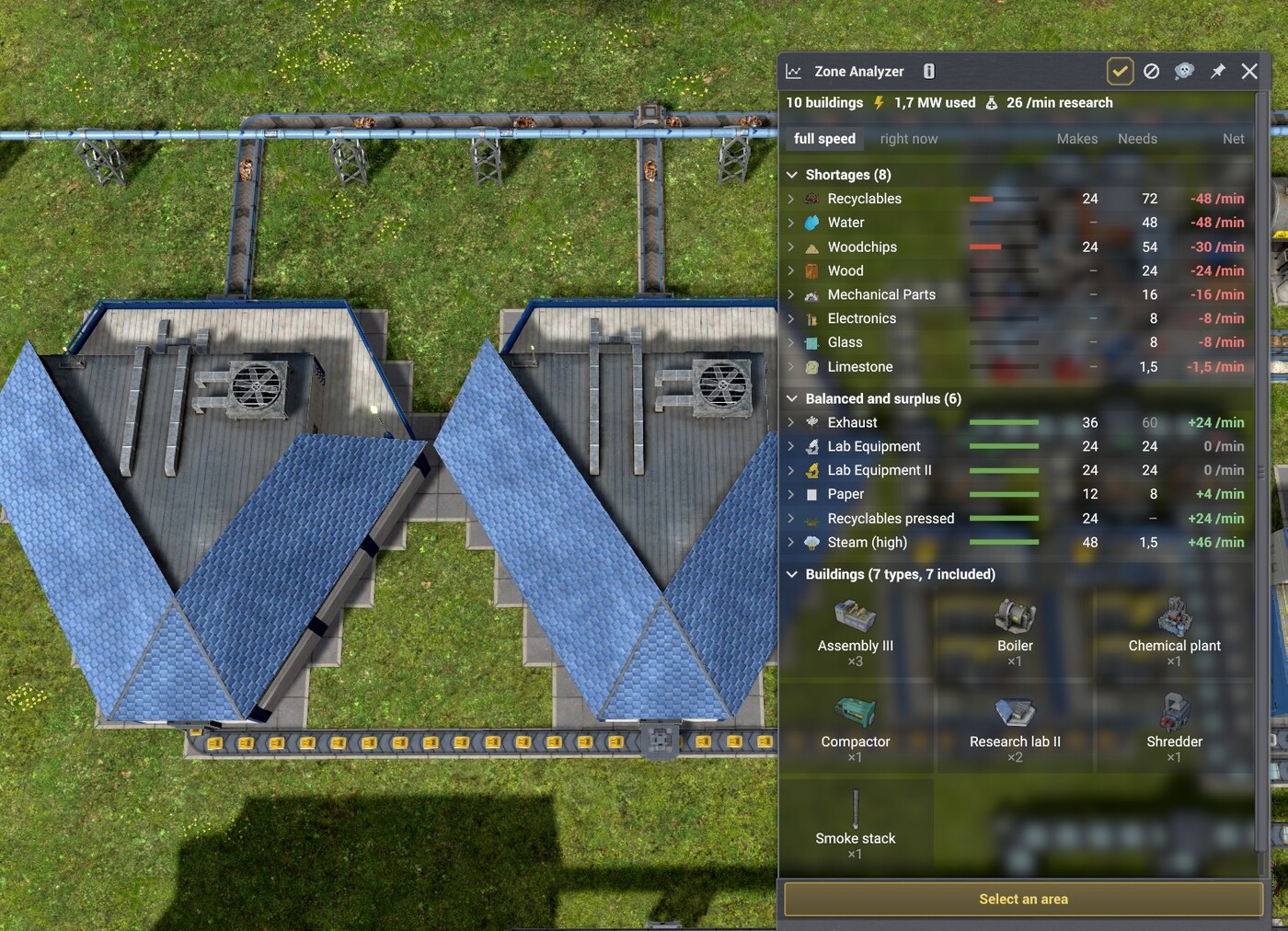
Exciting update with a brand new UI. Every resource is on one line now, and the
figures are lined up in columns. Click a line and the full detail unfolds underneath,
the same detail as before.
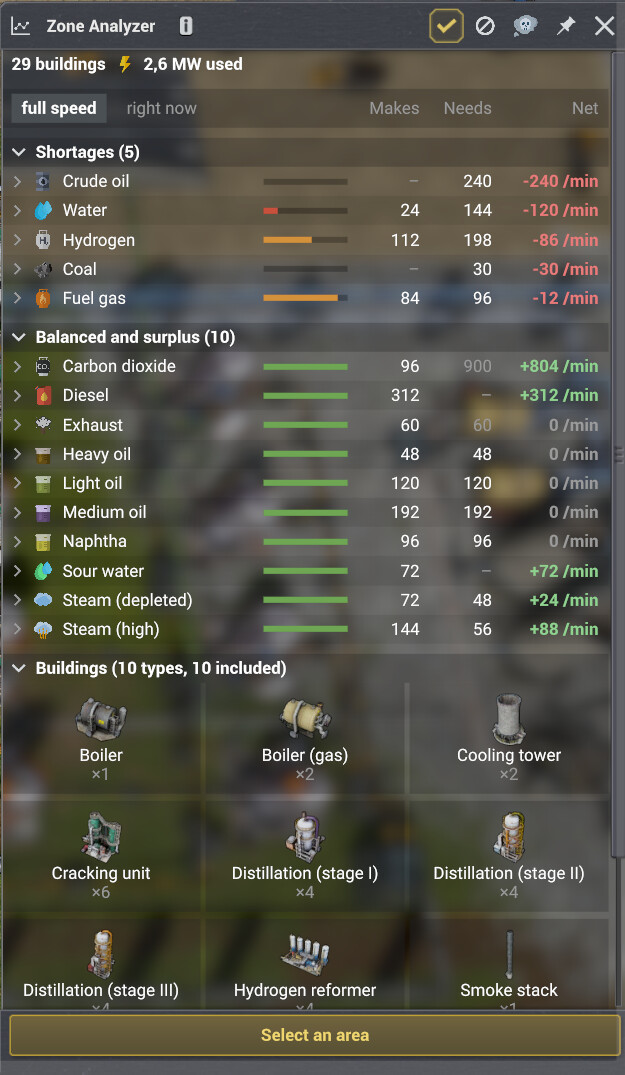
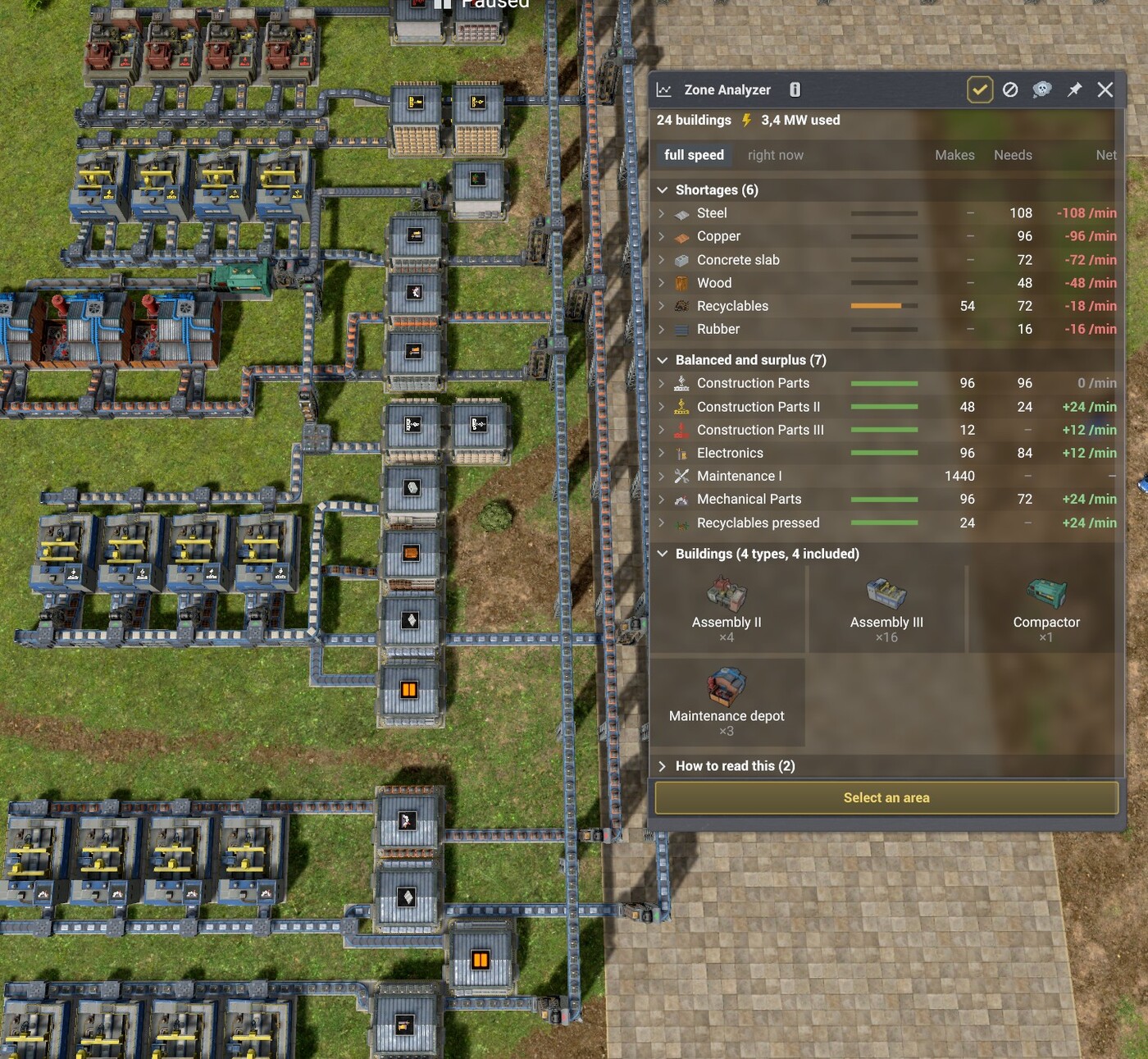
More buildings are counted: settlement service modules, ore and waste sorting, animal
farms, research labs, and maintenance parts.
The blocked-building warnings were the weak point of 0.1.0. They now check what a
machine is doing at that moment instead of trusting a year of history, so a machine
running with a full output buffer no longer gets accused of missing an input.
v1.3.0
Latest- Game version
- 0.8.6 - 0.8.7
- Released
- Aug 19, 2026
- File size
- 110.7 KB
- License
- CoI-Keep
Whole island: a balance of everything, no selection needed. This update
started as a suggestion by PForsberg on this very page.

- A new "ALL" button in the panel's header switches to an island-wide
balance: every product produced or used anywhere on the island last
month, Makes / Needs / Net, shortages listed first. Click it again to
jump straight back to whatever area or line you had open.
- These figures are read straight from totals the game already keeps for
the whole island, the same ones behind its own Statistics panel, so
there is no "full speed" column at this scale: only what was actually
measured.
- A search box filters the list by product name, and a "Shortages first /
A to Z" switch controls the sort order.

1.2.1

The F9 shortcut is now reconfigurable.

- If Moriarty's Keybind Framework is installed, Zone Analyzer's shortcut
shows up in the "Modded Keybinds" options tab, with F9 as the default. It
applies right away, no restart needed. Without that mod, nothing changes:
the shortcut stays F9.

1.2.0

Parallel branches, line preview on hover, and the mod finally has its own
icon.

- Bottlenecks now judge parallel branches. Two pipes running side by side
and meeting further on were never flagged before: removing one still let
the flow through the other. They are now weighed together, on their
combined throughput. If the balancer feeding them is set to split evenly,
the weakest branch sets the pace and the figure accounts for it.
- Hover a conveyor or pipe with "Follow a line" armed and the whole
connected line lights up before you click, so you see exactly what will
be analysed.
- The toolbar button and the window now carry the mod's own icon instead of
a borrowed one.

1.1.2

Fixes false bottlenecks. Thanks to everyone reporting what looks wrong.

- A building that has no reachable destination at all is no longer blamed on
every segment of the line. It used to add its own output to each pipe or
belt being checked, which could flag four healthy pipes at once.
- Storages on the line now count as a destination. A producer feeding only a
storage is no longer treated as going nowhere.

Real bottlenecks are unaffected: a segment that genuinely cannot carry what
must pass through it is still flagged, with the same figures.

1.1.1

Line analysis now follows each product on its own legal paths.

- Bottlenecks are checked on both sides: what the buildings downstream need,
and what the producers upstream have to push through toward their
destinations. A production line choking before its vent is now caught even
when nothing on it "consumes" in the recipe sense.
- Smoke stacks and flares now appear on a line, with their absorption
capacity shown in grey: absorbing is not demanding, but it is where the
flow goes, and it counts as a destination.
- A product only travels through the ports its recipe actually binds it to.
A boiler's CO2 line no longer lists its steam, each circuit gets its own
balance, and the boiler's own undersized output pipe is correctly flagged.

1.1.0

Follow a line: click any conveyor or pipe and get the balance of everything
connected to it. This update started as a suggestion by betrok on this very
page.

- A new "Follow a line" button sits next to "Select an area". One click on a
belt or pipe follows the whole line through storages, balancers, lifts and
sorters, and shows who feeds it against who draws from it, product by
product, with the same Makes / Needs / Net columns as the area view.
- The click picks the flow. On a network carrying several products, only the
ones that can actually travel through the clicked transport are counted:
sorter filters and belt directions are respected. Clicking a side branch
gives that branch's own balance.
- Bottleneck detection. Segments that are the only path to some buildings and
cannot carry what those buildings need at full speed are flagged, sorted by
severity, highlighted in red on the map, and the "Show me" button pans the
camera straight to them. Capacities come from the game's own transport
data, product stack sizes included.
- Storages on the line are shown with their stock. A storage that only trucks
can fill is marked as such: the game keeps no rate for truck deliveries, so
its supply is left out of the totals rather than guessed.
- Buffers, the storages that the line both fills and drains, have their own
section.
- Every row is clickable: the camera jumps to the building, and clicking
again cycles to the next one.
- Sections are color coded: green for what feeds the line, orange for what
draws from it, red for bottlenecks.
- All eleven languages are up to date.

Known limits, in the spirit of honest numbers: parallel branches are not
judged for bottlenecks yet, and a building whose output ports are
interchangeable is counted on a line whenever nothing proves otherwise.

1.0.1

Packaging fix, the mod itself is unchanged.

- The archive stored its file paths with Windows separators, so depending on the
unzip tool it could produce a handful of oddly named files instead of a proper
ZoneAnalyzer folder. Thanks to the player who reported it.

1.0.0

Workers are now counted, and the mod is verified against game version 0.8.7.

- The summary line shows how many workers the selected area employs: those
actually assigned right now, then the total the area asks for. A building that
is paused, or still under construction, gives its workers back, which is why
the two figures can differ.
- The count follows the building filter, so leaving a type out removes its
workers as well.
- Both numbers come straight from the game, nothing is estimated.

0.2.0

Exciting update with a brand new UI. Every resource is on one line now, and the
figures are lined up in columns.

A rebuilt panel
- Every resource is now one compact line: a coverage bar, then Makes, Needs and Net
lined up in columns. Click a line and the full detail unfolds underneath.
- One switch at the top swaps the whole panel between full speed and what your base
actually manages right now, instead of repeating both figures on every line.
- Shortages sit at the top, and the building filter moved below the balance where it
belongs.
- The window now resizes in height as well as width.

More buildings counted
- Settlement service modules, ore sorting, waste sorting, animal farms and research
labs are read too.
- Maintenance parts appear in the balance.
- Hospitals, housing and food modules stay out on purpose.

Fixes
- Blocked-building warnings are far more reliable: they check what a machine is doing
now instead of trusting a year of history.
- F9 closes the window instead of clearing the balance.
- All eleven languages have been completed.

0.1.0
- First release.
- New toolbar tool (shortcut F9): drag a box over your factory to get its resource balance.
- One line per resource: produced, needed, and the net balance per minute at full capacity.
- Shows how much of each resource has to come in from outside the selected area.
- Flags the buildings that are actually waiting on a resource, using the time the game
itself records for them rather than an estimate.
- Choose which buildings count. Every type in the selection is listed as a tile; click one
to leave it out and the balance updates at once.
- Electricity drawn and produced side by side, so you can tell whether an area powers itself.
- Mechanical power in MW, comparing what the turbines make against what the generators need.
- Works on buildings that are not built yet, so you can check a design while you lay it out.
- Flares and smoke stacks are read as disposal capacity, not as demand: an idle flare is
not a shortage. Pollution is left out of the balance entirely.
- An information button explains where each number comes from, and anything that is a
capacity rather than a measurement says so.
- Buildings the mod cannot measure are named instead of being dropped without a word.
- Sections fold away, so you can keep only the shortages on screen.
- Covers factories, refineries, smelters, water treatment, well pumps, maintenance depots,
steam turbines, power generators, farms and rainwater harvesters.
- Available in Czech, Dutch, English, French, German, Italian, Polish, Portuguese (Brazil),
Russian, Spanish and Ukrainian.
v1.2.1
- Game version
- 0.8.6 - 0.8.7
- Released
- Aug 19, 2026
- File size
- 103.1 KB
- License
- CoI-Keep
v1.2.0
- Game version
- 0.8.6 - 0.8.7
- Released
- Aug 16, 2026
- File size
- 101.1 KB
- License
- CoI-Keep
v1.1.2
- Game version
- 0.8.6 - 0.8.7
- Released
- Aug 16, 2026
- File size
- 97.5 KB
- License
- CoI-Keep
v1.1.1
- Game version
- 0.8.6 - 0.8.7
- Released
- Aug 15, 2026
- File size
- 97.1 KB
- License
- CoI-Keep
v1.1.0
- Game version
- 0.8.6 - 0.8.7
- Released
- Aug 15, 2026
- File size
- 95.7 KB
- License
- CoI-Keep
v1.0.1
- Game version
- 0.8.6 - 0.8.7
- Released
- Aug 12, 2026
- File size
- 84.5 KB
- License
- CoI-Keep
v1.0.0
- Game version
- 0.8.6 - 0.8.7
- Released
- Aug 12, 2026
- File size
- 84.3 KB
- License
- CoI-Keep
1.3.0
Whole island: a balance of everything, no selection needed. This update
started as a suggestion by PForsberg on this very page.

- A new "ALL" button in the panel's header switches to an island-wide
balance: every product produced or used anywhere on the island last
month, Makes / Needs / Net, shortages listed first. Click it again to
jump straight back to whatever area or line you had open.
- These figures are read straight from totals the game already keeps for
the whole island, the same ones behind its own Statistics panel, so
there is no "full speed" column at this scale: only what was actually
measured.
- A search box filters the list by product name, and a "Shortages first /
A to Z" switch controls the sort order.

1.2.1

The F9 shortcut is now reconfigurable.

- If Moriarty's Keybind Framework is installed, Zone Analyzer's shortcut
shows up in the "Modded Keybinds" options tab, with F9 as the default. It
applies right away, no restart needed. Without that mod, nothing changes:
the shortcut stays F9.

1.2.0

Parallel branches, line preview on hover, and the mod finally has its own
icon.

- Bottlenecks now judge parallel branches. Two pipes running side by side
and meeting further on were never flagged before: removing one still let
the flow through the other. They are now weighed together, on their
combined throughput. If the balancer feeding them is set to split evenly,
the weakest branch sets the pace and the figure accounts for it.
- Hover a conveyor or pipe with "Follow a line" armed and the whole
connected line lights up before you click, so you see exactly what will
be analysed.
- The toolbar button and the window now carry the mod's own icon instead of
a borrowed one.

1.1.2

Fixes false bottlenecks. Thanks to everyone reporting what looks wrong.

- A building that has no reachable destination at all is no longer blamed on
every segment of the line. It used to add its own output to each pipe or
belt being checked, which could flag four healthy pipes at once.
- Storages on the line now count as a destination. A producer feeding only a
storage is no longer treated as going nowhere.

Real bottlenecks are unaffected: a segment that genuinely cannot carry what
must pass through it is still flagged, with the same figures.

1.1.1

Line analysis now follows each product on its own legal paths.

- Bottlenecks are checked on both sides: what the buildings downstream need,
and what the producers upstream have to push through toward their
destinations. A production line choking before its vent is now caught even
when nothing on it "consumes" in the recipe sense.
- Smoke stacks and flares now appear on a line, with their absorption
capacity shown in grey: absorbing is not demanding, but it is where the
flow goes, and it counts as a destination.
- A product only travels through the ports its recipe actually binds it to.
A boiler's CO2 line no longer lists its steam, each circuit gets its own
balance, and the boiler's own undersized output pipe is correctly flagged.

1.1.0

Follow a line: click any conveyor or pipe and get the balance of everything
connected to it. This update started as a suggestion by betrok on this very
page.

- A new "Follow a line" button sits next to "Select an area". One click on a
belt or pipe follows the whole line through storages, balancers, lifts and
sorters, and shows who feeds it against who draws from it, product by
product, with the same Makes / Needs / Net columns as the area view.
- The click picks the flow. On a network carrying several products, only the
ones that can actually travel through the clicked transport are counted:
sorter filters and belt directions are respected. Clicking a side branch
gives that branch's own balance.
- Bottleneck detection. Segments that are the only path to some buildings and
cannot carry what those buildings need at full speed are flagged, sorted by
severity, highlighted in red on the map, and the "Show me" button pans the
camera straight to them. Capacities come from the game's own transport
data, product stack sizes included.
- Storages on the line are shown with their stock. A storage that only trucks
can fill is marked as such: the game keeps no rate for truck deliveries, so
its supply is left out of the totals rather than guessed.
- Buffers, the storages that the line both fills and drains, have their own
section.
- Every row is clickable: the camera jumps to the building, and clicking
again cycles to the next one.
- Sections are color coded: green for what feeds the line, orange for what
draws from it, red for bottlenecks.
- All eleven languages are up to date.

Known limits, in the spirit of honest numbers: parallel branches are not
judged for bottlenecks yet, and a building whose output ports are
interchangeable is counted on a line whenever nothing proves otherwise.

1.0.1

Packaging fix, the mod itself is unchanged.

- The archive stored its file paths with Windows separators, so depending on the
unzip tool it could produce a handful of oddly named files instead of a proper
ZoneAnalyzer folder. Thanks to the player who reported it.

1.0.0

Workers are now counted, and the mod is verified against game version 0.8.7.

- The summary line shows how many workers the selected area employs: those
actually assigned right now, then the total the area asks for. A building that
is paused, or still under construction, gives its workers back, which is why
the two figures can differ.
- The count follows the building filter, so leaving a type out removes its
workers as well.
- Both numbers come straight from the game, nothing is estimated.

0.2.0

Exciting update with a brand new UI. Every resource is on one line now, and the
figures are lined up in columns.

A rebuilt panel
- Every resource is now one compact line: a coverage bar, then Makes, Needs and Net
lined up in columns. Click a line and the full detail unfolds underneath.
- One switch at the top swaps the whole panel between full speed and what your base
actually manages right now, instead of repeating both figures on every line.
- Shortages sit at the top, and the building filter moved below the balance where it
belongs.
- The window now resizes in height as well as width.

More buildings counted
- Settlement service modules, ore sorting, waste sorting, animal farms and research
labs are read too.
- Maintenance parts appear in the balance.
- Hospitals, housing and food modules stay out on purpose.

Fixes
- Blocked-building warnings are far more reliable: they check what a machine is doing
now instead of trusting a year of history.
- F9 closes the window instead of clearing the balance.
- All eleven languages have been completed.

0.1.0
- First release.
- New toolbar tool (shortcut F9): drag a box over your factory to get its resource balance.
- One line per resource: produced, needed, and the net balance per minute at full capacity.
- Shows how much of each resource has to come in from outside the selected area.
- Flags the buildings that are actually waiting on a resource, using the time the game
itself records for them rather than an estimate.
- Choose which buildings count. Every type in the selection is listed as a tile; click one
to leave it out and the balance updates at once.
- Electricity drawn and produced side by side, so you can tell whether an area powers itself.
- Mechanical power in MW, comparing what the turbines make against what the generators need.
- Works on buildings that are not built yet, so you can check a design while you lay it out.
- Flares and smoke stacks are read as disposal capacity, not as demand: an idle flare is
not a shortage. Pollution is left out of the balance entirely.
- An information button explains where each number comes from, and anything that is a
capacity rather than a measurement says so.
- Buildings the mod cannot measure are named instead of being dropped without a word.
- Sections fold away, so you can keep only the shortages on screen.
- Covers factories, refineries, smelters, water treatment, well pumps, maintenance depots,
steam turbines, power generators, farms and rainwater harvesters.
- Available in Czech, Dutch, English, French, German, Italian, Polish, Portuguese (Brazil),
Russian, Spanish and Ukrainian.
No other mods depend on this mod yet.