
Boost++
v1.2.6Fine-tune production speed for every machine, belt and pipe individually — with a manager for sorting, renaming, comments, mass-boost, copy-boost, and more
- Source code
- No source provided
- Website
- https://discord.com/channels/803508556325584926/1481370238112239616
- Tags
- Tweaks Production Transports
All MORI++ keybinds can now be rebound, and other modders can register their own keybinds too. See Keybind Framework.
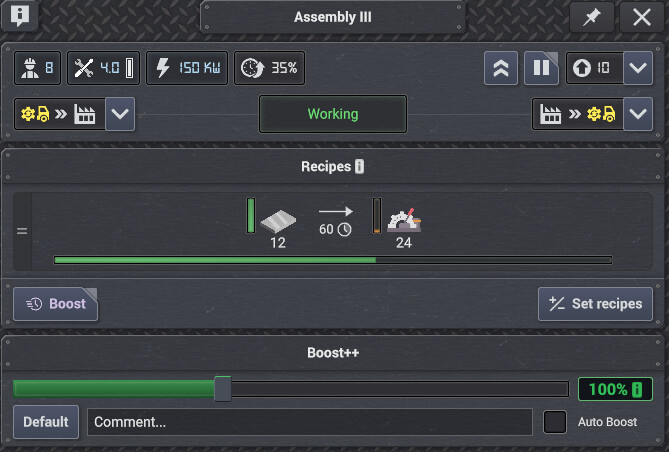
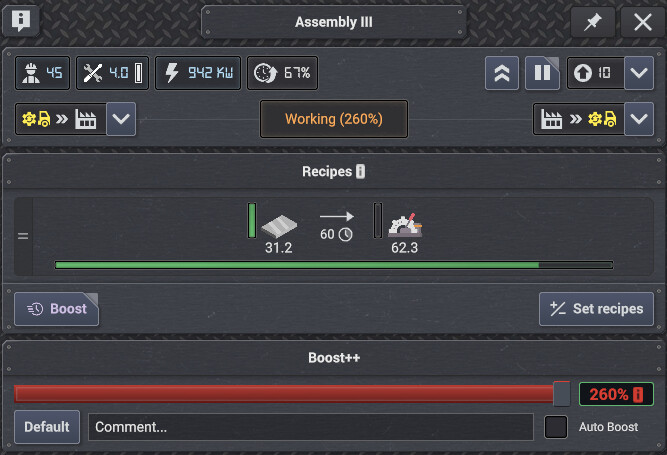
Open any building, belt, pipe, connector, lift, sorter or balancer and drag the Boost slider, or click the % and type an exact value. Below 100% the slider turns light blue, so throttled machines are easy to spot at a glance. Boost settings carry over when you copy-paste buildings.
🧭 The Boost Manager
Click the O (Overlord) button in the HUD, or press Alt + W.
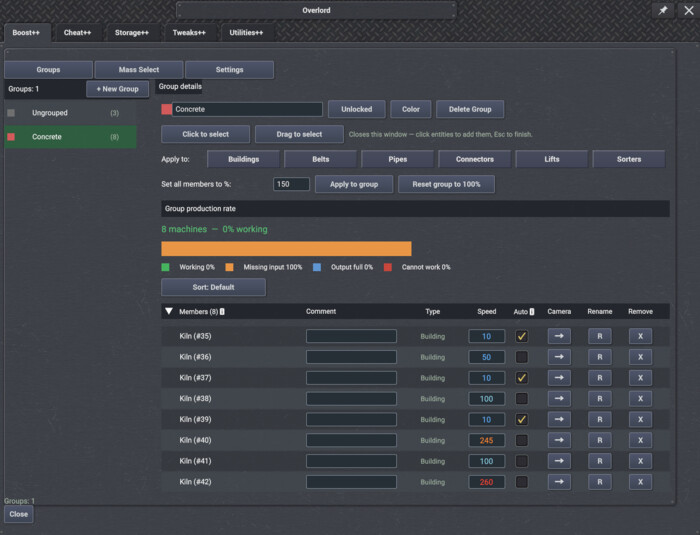
Groups
- Group buildings, belts and pipes into a production block and boost the whole block at once
- Add members by clicking them in the world, or drag a rectangle over an area
- Aim a change at just buildings, belts, pipes, connectors, lifts or sorters
- Rename members, type any member's % directly, sort by speed, name or type
- Color-code each group from an 18-colour picker
- Live group stats — working / missing input / output full / cannot work
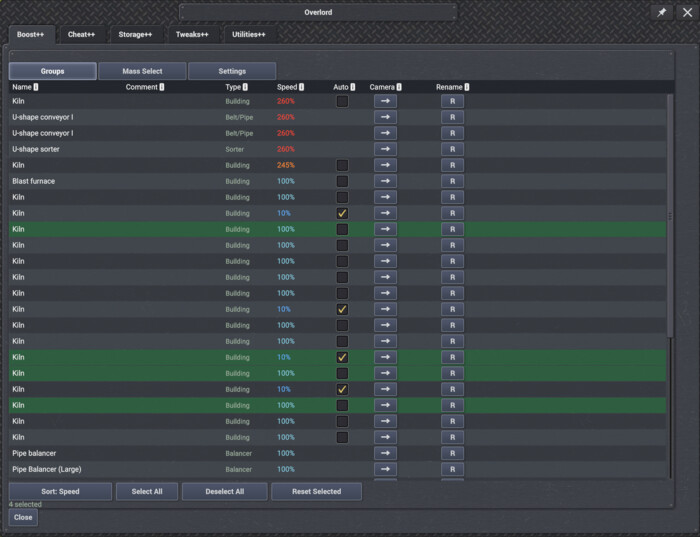
Mass Select
- Lists every boostable thing you own, including everything still at 100%
- Reset any selection back to 100% in one click
- Rename, sort, and jump the camera straight to any entry
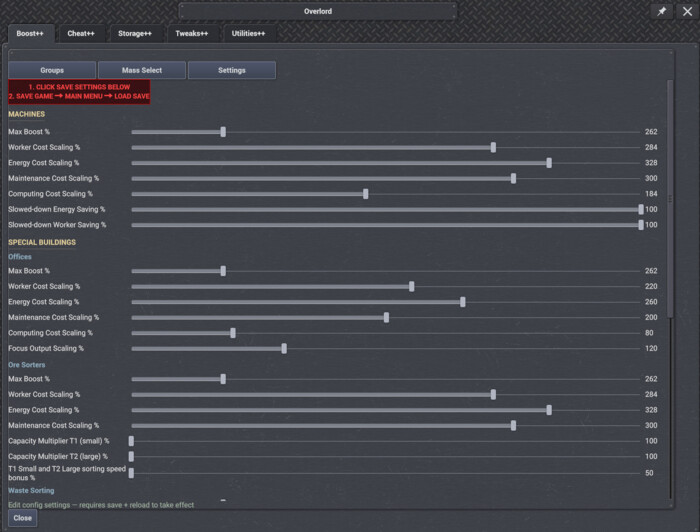
Settings
- Tune the mod's own limits in-game — max boost, ore sorter capacity (T1 and T2), sorting speed bonus and more
- Saved to a shared "Mori++ Saved settings" folder, so a reinstall won't wipe them
- One-click Reset all to Default
⚖️ Everything has a price
Boost is not free. Raising a building's speed raises its power draw, worker requirement and maintenance cost proportionally.
- Ore sorters, offices and waste plants each scale in their own way, suited to how they work
- Offices trade extra workers, power, compute and supplies for more Focus points
- Belts and pipes cost extra power and maintenance when boosted
- Boosted belts also hold more items — up to double at max boost, which helps long lines feed more machines
A boosted belt always draws power, even with its power setting turned off. This is intentional, for balance.
🌍 Languages
Boost++ supports every language the base game does.
💬 Feedback
Bugs, ideas and suggestions go in the Forum tab — please post in the right category and I'll keep an eye on it.
Optional: install Keybind Framework to rebind the Overlord hotkey.
See forum to post and let me know stuff!
Please post bugs, ideas, problems, improvements and so on on forum tab i will keep a look for it. Also please post in right category!
v1.2.6
Latest- Game version
- 0.8.2 - 0.8.7a
- Released
- Aug 21, 2026
- File size
- 1.6 MB
- License
- CoI-Open
────────────────────────────────────────────────────────────────────────
* AUTO BOOST ON A SINGLE BUILDING STILL WORKS THE SIMPLE WAY AND ONLY WATCHES YOUR GLOBAL STORAGE OF WHAT IT MAKES. LEAVE A BUILDING OUT OF A GROUP AND NOTHING CHANGES FOR IT.

- A full by-product no longer holds a building back. A full slag pile or nitrogen tank no longer slows the furnace or air separator making what you need.

- Molten metals are now followed as well, read from the building's own output when you have no molten storage.

- Buildings no longer stack up a high boost when the stage after them is slowed down and cannot take what they make.

────────────────────────────────────────────────────────────────────────
* NEW: LINK A STORAGE TO A BOOST GROUP AND THE WHOLE PRODUCTION LINE WORKS TOGETHER TO KEEP THAT ONE STORAGE FULL, INSTEAD OF EACH BUILDING DECIDING ON ITS OWN.

- Click Link storage in the group's details, then click the storage you want kept full. The group then shows what it is linked to and how full it is.

- The boost goes to the stage that is actually holding the line back, instead of to a machine that already makes more than the next stage can take.

- A building waiting for products, or with a full output, drops to its slowest speed so it stops holding workers and power away from the rest of the line.

────────────────────────────────────────────────────────────────────────
* DRAG THE GRIP IN THE OVERLORD WINDOW'S BOTTOM-RIGHT CORNER TO SET ITS SIZE, AND EVERY TAB LAYS ITSELF OUT FOR THE SIZE YOU PICK.

- Text reflows to the width you give it, so long labels and tooltips stay readable as the window grows.

- Buttons, sliders and rows stretch and line up with the window, keeping columns even at any size.

- Double-click the grip to put the window back to its default size.

────────────────────────────────────────────────────────────────────────
* EACH BOOST GROUP CAN BE GIVEN A LOWEST AND HIGHEST BOOST, AND AUTO BOOST KEEPS ITS BUILDINGS INSIDE THAT RANGE NO MATTER HOW FULL OR EMPTY YOUR STORAGE GETS.

- Set both from the group's details, under Min/Max boost. Leave them off and Auto Boost can use the full boost range you have unlocked.

- Your own boost slider is never limited by this.

────────────────────────────────────────────────────────────────────────
* THE PIN BUTTON IN THE OVERLORD TITLE BAR HOLDS THE WINDOW IN PLACE WHILE YOU WORK, SO ESC AND PICKING A TOOL BOTH LEAVE IT OPEN (THANKS MAG FOR THE REPORT).

- It starts pinned each time you load a save. Unpin it and it stays unpinned every time you open the window, until you load a save again.

────────────────────────────────────────────────────────────────────────
* THE OVERLORD WINDOW NOW HAS A SIZE DROPDOWN, 85% TO 120% IN 5% STEPS, SEPARATE FROM THE GAME'S OWN UI SCALE (THANKS VLADOVLAK FOR THE REPORT).

- Tooltips inside the window follow this size, while tooltips anywhere else in the game stay at their normal size (thanks Mag for the report).

────────────────────────────────────────────────────────────────────────
* AUTO BOOST NOW UPDATES EVERY 6 SECONDS AND MOVES EACH BUILDING IN SMALLER STEPS, SO POWER USE AND WORKER NUMBERS SETTLE INSTEAD OF SWINGING.

- A dip in power no longer slows the building you need most first. Buildings making something you already have plenty of are slowed down before it.

────────────────────────────────────────────────────────────────────────
* THE VANILLA COPY SETTINGS TOOL NOW ALSO COPIES BOOST++'S BOOST PERCENTAGE BETWEEN MACHINES AND SPEED BOOST BETWEEN MATCHING BELTS OR PIPES (THANKS DENIS FOR THE SUGGESTION).

────────────────────────────────────────────────────────────────────────
* A ROLL-UP BUTTON IN THE OVERLORD TITLE BAR FOLDS THE WINDOW DOWN TO JUST ITS TITLE BAR, AND CLICKING IT AGAIN OPENS IT BACK UP (THANKS MAG FOR THE ICONS).

────────────────────────────────────────────────────────────────────────
v1.2.5
- Game version
- 0.8.2 - 0.8.7a
- Released
- Aug 16, 2026
- File size
- 1.6 MB
- License
- CoI-Open
* The Overlord window now always shows at 100% size, whatever UI scale you play at (thanks warrenc for the report). At 125% and higher the buttons at the bottom were cut off the screen and everything needed far more scrolling.

* The Computing Cost Scaling sliders no longer jump back to their default value after loading a save when set to 0 (thanks warrenc for the report).
v1.2.4
- Game version
- 0.8.2 - 0.8.7a
- Released
- Aug 15, 2026
- File size
- 1.6 MB
- License
- CoI-Open
* Boosted connectors are no longer stuck at 1800 per minute — at 260% boost they now move up to 5400, and even more with higher boost unlocked.

* Boosted lifts are no longer stuck at 1800 per minute either — they now keep up with the boosted belts feeding them.

* Belt, pipe, connector, balancer, sorter and lift windows now show a live throughput readout that updates while the window is open.

* Added two new sliders to the group color picker: S controlls saturation, and A controls how see-through the highlight is.

* The "+X% inventory" text on belt windows is now "+X% capacity", and hovering it now explains what it does.

* Group highlighting is now drawn by the mods custom version itself instead of the game's built-in one, so a selected group is far easier to pick out.

- Machines are colored over their whole shape, instead of only getting a thin outline that was easy to miss.

- Belts and pipes are covered along their full length, including the items riding on them.

- Dark colors now show up properly — a dark green group looks dark green instead of turning bright or invisible almost.

* Lots of changes made to the translations.

- Many dead strings that are no longer in use have been removed.

- Missing strings for newer parts of the mod have been added.

- Text that was falling back to English now has its missing translations.

- Wrong translations, wording and grammar have been updated.

- If anything still reads wrong, update the translation yourself and send it to me in a DM or on the hub, and I will get it into the mod.
v1.2.3
- Game version
- 0.8.2 - 0.8.7a
- Released
- Aug 14, 2026
- File size
- 1.5 MB
- License
- CoI-Open
* Now supports game version 0.8.7a.

* The Overlord window is now the same size on every tab, so it no longer jumps in size when you switch between boost and the other mod tab.

* Copying a boosted belt or pipe now keeps its boost — the new belt you place comes out at the same speed instead of dropping back to 100%. Belts and pipes
copied as part of an area selection or a blueprint keep their boost too. (thanks Denis for mentioning this)

- If you connect it to a belt or pipe running at a different speed, the two become one belt and the whole connected run goes back to the default 100%. Set
the speed again afterwards if you want the finished run boosted.

* The Boost Manager has had a full visual revamp. It now uses the same look as the rest of the game and the other Mori++ windows, with proper tabs, clear
section headings and dividing lines between each part, and more room to breathe. Everything used to sit crammed together in one block, which made it hard
to read at a glance — the group list, group details, production rate and member list are now clearly separated.

* You can now pick any color you like for a group, instead of only the twelve preset ones. The Color button is now a palette icon — click it and you get the
presets as before, plus red, green and blue sliders with a live preview of the color you are mixing. Drag a slider or click its number and type a value,
then press Apply changes.

- The color you choose is used both for the group's highlight in the world and for the group in the Boost Manager.

* New Statistics button next to a group's production rate. It opens a window listing every product the group takes in and everything it makes, so you can
see at a glance which single item is holding the whole group back instead of guessing from the bar.

- Each line shows the normal speed rate (what the group would do with no boost), what it is actually managing right now, and the difference as a
percentage. The difference goes plus when boost puts the group ahead and minus when it falls behind, and is colored green, amber or red.

- All rates are per month and update live while the window is open.

* Deleting a group now asks you to confirm first. Clicking Delete Group opens a small box showing the group's name with
Yes and No buttons, so one stray click can no longer wipe a group you spent time filling.

* The selected group in the list now has a gold border around it as well as the green highlight, so it is obvious at a
glance which group you are looking at.

* The buttons at the bottom of the Settings tab (Save Settings, Reset all to Default, Backup Settings, Restore Settings)
now sit in their own block that is always on screen.

* The red reminder at the top of the Settings tab now spans the whole window and wraps onto more lines, so longer
translations are no longer cut off.

* The selected Belts / Pipes / Sorters filter buttons are now marked with a yellow border around the whole button
instead of a thin line under the text, so it is easier to see which types you have picked.

* Fixed wrong text on the group lock button and its tooltip in two languages.

- Russian showed a padlock symbol instead of words, and the two symbols were swapped, so a locked group looked
unlocked and an unlocked one looked locked. It now reads Заблокирована / Разблокирована.

- The Ukrainian tooltip told you to unlock the group, when it should say to lock a group once you have finished
filling it.

* Huge thanks to Hoochie for the suggestions that led to the interface changes above.
v1.2.2
- Game version
- 0.8.2 - 0.8.7
- Released
- Aug 10, 2026
- File size
- 1.5 MB
- License
- CoI-Open
* Fixed the pin on the Overlord window doing nothing — it now actually closes the window when you open something else (a building, another window) while unpinned, and starts pinned by default the first time you open it each session. (thanks Hoochie for the report)
* New "Auto Boost" checkmark in a building's Boost++ panel. When ticked, the building sets its own boost speed based on how full your global storage of the
product it makes is — speeding up when stock runs low and slowing down when it piles up. It never uses more power or workers than you have spare, and the
slider locks while it is on. Available on machines such as smelters and assemblies.

- Buildings slowed below 100% now use less electricity and fewer workers instead of costing the same as default speed.

- Auto Boost can also be turned on and off from the Boost Manager — an Auto column in the group member list and in the Mass Select tab.

- The Boost++ settings let you tune the storage thresholds, how often it updates, how much power and how many workers to keep spare, and how big each
change can be.

- You can also set how much electricity and how many workers a slowed-down building saves.
v1.2.1
- Game version
- 0.8.2 - 0.8.7
- Released
- Aug 07, 2026
- File size
- 1.5 MB
- License
- CoI-Open
* Now supports game version 0.8.7.
* Hovering the "O" button on the HUD now explains that it opens the Mori++ Suite settings and shows the keybind to open it (Alt + W). Translated into all languages.
* Added support for 13 more languages — Catalan, Czech, Dutch, Estonian, French, Hungarian, Japanese, Korean, Norwegian, Polish, Swedish, Traditional Chinese and Turkish. Boost++ now supports every language the base game does.
* Fixed the Overlord window title, and its Save and Load buttons and their tooltips, always showing in English no matter your language.
* Fixed a few status messages (sorting-boost percentages, group add/remove notices) that stayed in English in every language.
* Fixed the Save button showing as an unrelated word in Russian and Ukrainian.
* General UI fixes — several buttons and names no longer wrap or overlap in some languages.
v1.2.0
- Game version
- 0.8.2 - 0.8.6b
- Released
- Jul 29, 2026
- File size
- 1.4 MB
- License
- CoI-Open
* Now supports game version 0.8.6b.
v1.1.9
- Game version
- 0.8.2 - 0.8.6
- Released
- Jul 24, 2026
- File size
- 1.4 MB
- License
- CoI-Open
* Saved settings now live in a shared "Mori++ Saved settings" folder outside the mod folder, so a manual delete or a mod manager wiping the folder no longer loses them. Because of this move, all your current settings reset to default one time — set everything up again and from then on they're kept safe in that folder.
* The Mori++ HUD buttons are now one single "O" Overlord button — click it to open one window with a tab for each installed mod's settings, instead of a separate button per mod.
* Overlord now has its own keybind (Alt+W by default) to open or close it. Can be changed in Keybind Framework if installed.
* Balancers can now be boosted just like connectors, lifts and sorters — from the balancer window, groups, and mass select.
* Click to select and Drag to select (Mass Select tab) now switch your mouse cursor to a select-area icon while active, so it's clear the tool is on.
* Fixed the copy tool not carrying over an under-100% boost when copy-pasting buildings — it reset to 100% instead. (thanks Denis for the report)
* Fixed Ore Sorting Plant boost losing its sorting speed bonus when Storage++ overrides its capacity — speed boost works again. (thanks Hyperion2950 for the report)
* Fixed the Groups tab collapsing into a narrow strip with squashed, wrapped buttons.
v1.1.8
- Game version
- 0.8.2 - 0.8.6
- Released
- Jul 24, 2026
- File size
- 1.4 MB
- License
- CoI-Open
-----
v1.1.7
- Game version
- 0.8.2 - 0.8.6
- Released
- Jul 18, 2026
- File size
- 1.4 MB
- License
- CoI-Open
* Now supports game version 0.8.6 (experimental), and remains compatible back to 0.8.4.
* Machines can now be set below 100% speed, all the way down to 10% — not just boosted above it — so you can slow one down to balance production flows. The Boost++ slider and value turn light blue when under 100%. (thanks Serjevski for the suggestion)
v1.2.6 | 2026-08-16
────────────────────────────────────────────────────────────────────────
* AUTO BOOST ON A SINGLE BUILDING STILL WORKS THE SIMPLE WAY AND ONLY WATCHES YOUR GLOBAL STORAGE OF WHAT IT MAKES. LEAVE A BUILDING OUT OF A GROUP AND NOTHING CHANGES FOR IT.

- A full by-product no longer holds a building back. A full slag pile or nitrogen tank no longer slows the furnace or air separator making what you need.

- Molten metals are now followed as well, read from the building's own output when you have no molten storage.

- Buildings no longer stack up a high boost when the stage after them is slowed down and cannot take what they make.

────────────────────────────────────────────────────────────────────────
* NEW: LINK A STORAGE TO A BOOST GROUP AND THE WHOLE PRODUCTION LINE WORKS TOGETHER TO KEEP THAT ONE STORAGE FULL, INSTEAD OF EACH BUILDING DECIDING ON ITS OWN.

- Click Link storage in the group's details, then click the storage you want kept full. The group then shows what it is linked to and how full it is.

- The boost goes to the stage that is actually holding the line back, instead of to a machine that already makes more than the next stage can take.

- A building waiting for products, or with a full output, drops to its slowest speed so it stops holding workers and power away from the rest of the line.

────────────────────────────────────────────────────────────────────────
* DRAG THE GRIP IN THE OVERLORD WINDOW'S BOTTOM-RIGHT CORNER TO SET ITS SIZE, AND EVERY TAB LAYS ITSELF OUT FOR THE SIZE YOU PICK.

- Text reflows to the width you give it, so long labels and tooltips stay readable as the window grows.

- Buttons, sliders and rows stretch and line up with the window, keeping columns even at any size.

- Double-click the grip to put the window back to its default size.

────────────────────────────────────────────────────────────────────────
* EACH BOOST GROUP CAN BE GIVEN A LOWEST AND HIGHEST BOOST, AND AUTO BOOST KEEPS ITS BUILDINGS INSIDE THAT RANGE NO MATTER HOW FULL OR EMPTY YOUR STORAGE GETS.

- Set both from the group's details, under Min/Max boost. Leave them off and Auto Boost can use the full boost range you have unlocked.

- Your own boost slider is never limited by this.

────────────────────────────────────────────────────────────────────────
* THE PIN BUTTON IN THE OVERLORD TITLE BAR HOLDS THE WINDOW IN PLACE WHILE YOU WORK, SO ESC AND PICKING A TOOL BOTH LEAVE IT OPEN (THANKS MAG FOR THE REPORT).

- It starts pinned each time you load a save. Unpin it and it stays unpinned every time you open the window, until you load a save again.

────────────────────────────────────────────────────────────────────────
* THE OVERLORD WINDOW NOW HAS A SIZE DROPDOWN, 85% TO 120% IN 5% STEPS, SEPARATE FROM THE GAME'S OWN UI SCALE (THANKS VLADOVLAK FOR THE REPORT).

- Tooltips inside the window follow this size, while tooltips anywhere else in the game stay at their normal size (thanks Mag for the report).

────────────────────────────────────────────────────────────────────────
* AUTO BOOST NOW UPDATES EVERY 6 SECONDS AND MOVES EACH BUILDING IN SMALLER STEPS, SO POWER USE AND WORKER NUMBERS SETTLE INSTEAD OF SWINGING.

- A dip in power no longer slows the building you need most first. Buildings making something you already have plenty of are slowed down before it.

────────────────────────────────────────────────────────────────────────
* THE VANILLA COPY SETTINGS TOOL NOW ALSO COPIES BOOST++'S BOOST PERCENTAGE BETWEEN MACHINES AND SPEED BOOST BETWEEN MATCHING BELTS OR PIPES (THANKS DENIS FOR THE SUGGESTION).

────────────────────────────────────────────────────────────────────────
* A ROLL-UP BUTTON IN THE OVERLORD TITLE BAR FOLDS THE WINDOW DOWN TO JUST ITS TITLE BAR, AND CLICKING IT AGAIN OPENS IT BACK UP (THANKS MAG FOR THE ICONS).

────────────────────────────────────────────────────────────────────────
v1.2.5 | 2026-08-15
* The Overlord window now always shows at 100% size, whatever UI scale you play at (thanks warrenc for the report). At 125% and higher the buttons at the bottom were cut off the screen and everything needed far more scrolling.

* The Computing Cost Scaling sliders no longer jump back to their default value after loading a save when set to 0 (thanks warrenc for the report).
v1.2.4 | 2026-08-14
* Boosted connectors are no longer stuck at 1800 per minute — at 260% boost they now move up to 5400, and even more with higher boost unlocked.

* Boosted lifts are no longer stuck at 1800 per minute either — they now keep up with the boosted belts feeding them.

* Belt, pipe, connector, balancer, sorter and lift windows now show a live throughput readout that updates while the window is open.

* Added two new sliders to the group color picker: S controlls saturation, and A controls how see-through the highlight is.

* The "+X% inventory" text on belt windows is now "+X% capacity", and hovering it now explains what it does.

* Group highlighting is now drawn by the mods custom version itself instead of the game's built-in one, so a selected group is far easier to pick out.

- Machines are colored over their whole shape, instead of only getting a thin outline that was easy to miss.

- Belts and pipes are covered along their full length, including the items riding on them.

- Dark colors now show up properly — a dark green group looks dark green instead of turning bright or invisible almost.

* Lots of changes made to the translations.

- Many dead strings that are no longer in use have been removed.

- Missing strings for newer parts of the mod have been added.

- Text that was falling back to English now has its missing translations.

- Wrong translations, wording and grammar have been updated.

- If anything still reads wrong, update the translation yourself and send it to me in a DM or on the hub, and I will get it into the mod.
v1.2.3 | 2026-08-12
* Now supports game version 0.8.7a.

* The Overlord window is now the same size on every tab, so it no longer jumps in size when you switch between boost and the other mod tab.

* Copying a boosted belt or pipe now keeps its boost — the new belt you place comes out at the same speed instead of dropping back to 100%. Belts and pipes
copied as part of an area selection or a blueprint keep their boost too. (thanks Denis for mentioning this)

- If you connect it to a belt or pipe running at a different speed, the two become one belt and the whole connected run goes back to the default 100%. Set
the speed again afterwards if you want the finished run boosted.

* The Boost Manager has had a full visual revamp. It now uses the same look as the rest of the game and the other Mori++ windows, with proper tabs, clear
section headings and dividing lines between each part, and more room to breathe. Everything used to sit crammed together in one block, which made it hard
to read at a glance — the group list, group details, production rate and member list are now clearly separated.

* You can now pick any color you like for a group, instead of only the twelve preset ones. The Color button is now a palette icon — click it and you get the
presets as before, plus red, green and blue sliders with a live preview of the color you are mixing. Drag a slider or click its number and type a value,
then press Apply changes.

- The color you choose is used both for the group's highlight in the world and for the group in the Boost Manager.

* New Statistics button next to a group's production rate. It opens a window listing every product the group takes in and everything it makes, so you can
see at a glance which single item is holding the whole group back instead of guessing from the bar.

- Each line shows the normal speed rate (what the group would do with no boost), what it is actually managing right now, and the difference as a
percentage. The difference goes plus when boost puts the group ahead and minus when it falls behind, and is colored green, amber or red.

- All rates are per month and update live while the window is open.

* Deleting a group now asks you to confirm first. Clicking Delete Group opens a small box showing the group's name with
Yes and No buttons, so one stray click can no longer wipe a group you spent time filling.

* The selected group in the list now has a gold border around it as well as the green highlight, so it is obvious at a
glance which group you are looking at.

* The buttons at the bottom of the Settings tab (Save Settings, Reset all to Default, Backup Settings, Restore Settings)
now sit in their own block that is always on screen.

* The red reminder at the top of the Settings tab now spans the whole window and wraps onto more lines, so longer
translations are no longer cut off.

* The selected Belts / Pipes / Sorters filter buttons are now marked with a yellow border around the whole button
instead of a thin line under the text, so it is easier to see which types you have picked.

* Fixed wrong text on the group lock button and its tooltip in two languages.

- Russian showed a padlock symbol instead of words, and the two symbols were swapped, so a locked group looked
unlocked and an unlocked one looked locked. It now reads Заблокирована / Разблокирована.

- The Ukrainian tooltip told you to unlock the group, when it should say to lock a group once you have finished
filling it.

* Huge thanks to Hoochie for the suggestions that led to the interface changes above.
v1.2.2 | 2026-08-07
* Fixed the pin on the Overlord window doing nothing — it now actually closes the window when you open something else (a building, another window) while unpinned, and starts pinned by default the first time you open it each session. (thanks Hoochie for the report)
* New "Auto Boost" checkmark in a building's Boost++ panel. When ticked, the building sets its own boost speed based on how full your global storage of the
product it makes is — speeding up when stock runs low and slowing down when it piles up. It never uses more power or workers than you have spare, and the
slider locks while it is on. Available on machines such as smelters and assemblies.

- Buildings slowed below 100% now use less electricity and fewer workers instead of costing the same as default speed.

- Auto Boost can also be turned on and off from the Boost Manager — an Auto column in the group member list and in the Mass Select tab.

- The Boost++ settings let you tune the storage thresholds, how often it updates, how much power and how many workers to keep spare, and how big each
change can be.

- You can also set how much electricity and how many workers a slowed-down building saves.
v1.2.1 | 2026-07-29
* Now supports game version 0.8.7.
* Hovering the "O" button on the HUD now explains that it opens the Mori++ Suite settings and shows the keybind to open it (Alt + W). Translated into all languages.
* Added support for 13 more languages — Catalan, Czech, Dutch, Estonian, French, Hungarian, Japanese, Korean, Norwegian, Polish, Swedish, Traditional Chinese and Turkish. Boost++ now supports every language the base game does.
* Fixed the Overlord window title, and its Save and Load buttons and their tooltips, always showing in English no matter your language.
* Fixed a few status messages (sorting-boost percentages, group add/remove notices) that stayed in English in every language.
* Fixed the Save button showing as an unrelated word in Russian and Ukrainian.
* General UI fixes — several buttons and names no longer wrap or overlap in some languages.
v1.2.0 | 2026-07-29
* Now supports game version 0.8.6b.
v1.1.9 | 2026-07-24
* Saved settings now live in a shared "Mori++ Saved settings" folder outside the mod folder, so a manual delete or a mod manager wiping the folder no longer loses them. Because of this move, all your current settings reset to default one time — set everything up again and from then on they're kept safe in that folder.
* The Mori++ HUD buttons are now one single "O" Overlord button — click it to open one window with a tab for each installed mod's settings, instead of a separate button per mod.
* Overlord now has its own keybind (Alt+W by default) to open or close it. Can be changed in Keybind Framework if installed.
* Balancers can now be boosted just like connectors, lifts and sorters — from the balancer window, groups, and mass select.
* Click to select and Drag to select (Mass Select tab) now switch your mouse cursor to a select-area icon while active, so it's clear the tool is on.
* Fixed the copy tool not carrying over an under-100% boost when copy-pasting buildings — it reset to 100% instead. (thanks Denis for the report)
* Fixed Ore Sorting Plant boost losing its sorting speed bonus when Storage++ overrides its capacity — speed boost works again. (thanks Hyperion2950 for the report)
* Fixed the Groups tab collapsing into a narrow strip with squashed, wrapped buttons.
v1.1.8 | 2026-07-20
-----
v1.1.7 | 2026-07-15
* Now supports game version 0.8.6 (experimental), and remains compatible back to 0.8.4.
* Machines can now be set below 100% speed, all the way down to 10% — not just boosted above it — so you can slow one down to balance production flows. The Boost++ slider and value turn light blue when under 100%. (thanks Serjevski for the suggestion)
v1.1.6 | 2026-07-01
* All translations have been updated, thanks to Hoochie for the updated Russian translation.
* Ore sorter capacity boosts now automatically step aside when Storage++ overrides that sorter's capacity — sorting speed boosts keep working as normal.
v1.1.5 | 2026-06-24
* The Mass Select tab now lists every boostable building, belt, pipe, connector, lift and sorter — including ones still at 100% — instead of only already-boosted machines.
* Added a Rename button to each row in the Mass Select tab.
* Added a Sort button to the Mass Select tab — order by boost %, name (A-Ö) or type, remembered between sessions.
v1.1.4 | 2026-06-21
* You can now add Connectors, Lifts and Sorters to groups with "Click to select" and "Drag to select" — previously only buildings, belts and pipes could be grouped.
* New Connectors, Lifts and Sorters buttons in the group "Apply to" row, so Apply and Reset can target those types like buildings, belts and pipes.
* New Sort button for group members — order by speed, name (A-Ö) or type, and your choice is now remembered between sessions.
* Renaming and editing in the manager now updates instantly instead of taking several seconds or needing the window closed and reopened.
* The Boost slider now works on connectors, lifts and sorters too — open one and drag the slider to raise that building's throughput, like belts and machines. (Thanks warrenc for report on connectors chokepoint!)
* Speed-boosted belts now hold more items too — scales with the boost, up to double at max. Helps long belt lines feed more machines at the cost of much more power use as balance.
From 0-49% it is regular boost way and after that the curve for inventory boost kicks in. (thanks notmuted for great suggestion and helping test the version)
v1.1.3 | 2026-06-13
* I missed adding things new version above have everything. =D
v1.1.2 | 2026-06-07
* Max Boost limit raised from 320% to 1000% — By request from user warrenc. I guess if you gonna cheat you want to go to "Ludicrous Speed" cheats XD.
v1.1.1 | 2026-05-31
* Added a fix to pipes and molten channels that was a problem adding power by misstake to them. This might have caused
The very rare crashes 4 users had. 2 users have tested this new fix and reporting no crashes so far.
* Fixed boosted belt/pipe throughput showing the un-boosted (vanilla) number in the window after a save reload — the displayed value is now correct on load without moving the slider. (Display only; the actual boost always worked.)
* Added a pin button to the window — pin it to keep it open (thanks Malibu2 for the suggestion).
* Added missing translations for multiple languages (thanks kukularra for reporting the missing strings).
* Added more missing translations across all languages.
* Updated Ukrainian translation — huge thanks to SirColibris for the proofreading and corrections.
v1.1.0 | 2026-05-25
* New "Drag to select" button — drag a rectangle to add everything inside to a group. (thanks Zafaron and Serjevski for the suggestion)
* If there is anything you don't feel is right in Ukrainian language and wan't something changed/added contact SirColibris on Discord in COI server.
v1.0.9 | 2026-05-23
* Old saves — all pre-existing boosted items with no group are automatically migrated into an "Old Migrated Boosted Items" group on first load.
* Group member speed values are now editable — click the speed value in any member row to type a new percentage directly.
* Color picker — the Color button now opens a color selection popup with 18 colors to choose from (was 6 colors cycling on each click before).
* Mass Select tab — each row now has a → jump-to-camera button, same as the Groups tab member rows. (thanks Serjevski for the suggestion)
* Added Simplified Chinese translation. The mod now supports 8 languages.
* Updated Ukrainian translation with proofreader refinements.
v1.0.8 | 2026-05-22
* New "Groups" tab — group buildings, belts and pipes together and boost the whole production block at once. Set one % across every member, optionally filter to just belts or just pipes,
and see aggregate production stats (working / missing input / output full / cannot work) for the group.
* Add entities to a group with the "Select entities" button — the window closes, you click entities in the world, and they highlight in the group's colour.
* The boost % beside the slider is now a proper text field — click it and type in the exact value you want.
* Removed the "Mass Boost" and "Belts & Pipes" tabs — the new Groups tab replaces them with more flexible control.
* Thanks to Serjevski for the great idea, and for helping test and improve it with better suggestions.
* Added Spanish, Portuguese, Ukrainian and Italian translations. The mod now supports 7 languages in total: English, German, Russian, Spanish, Portuguese, Ukrainian and Italian.
* Updated the mod thumbnail.
* Fixed translation errors.
* Fully translated the Settings tab.
* Settings tab window is now larger and uses the full space, so there is far less scrolling (all languages).
* Russian and German setting names no longer wrap or get cut off.
* New "Reset all to Default" button in the Settings tab to restore every value at once.
v1.0.7 | 2026-05-13
* New "Sorting Speed Bonus %" slider in ore sorter settings
— controls max sorting speed increase at max boost (default 50, new max is 150%).
* Max boost slider cap raised from 280% to 320% for all building types.
v1.0.6 | 2026-05-11
* Ore Sorter Capacity Multiplier slider split into T1 (small) and T2 (large) so each tier can be tuned independently. Existing saved value migrates to T2.
v1.0.5 | 2026-05-10
* Updated manifest for latest version.
v1.0.4 | 2026-05-09
* New "Capacity Multiplier %" slider in Boost Manager Settings → Ore Sorters (100% to 500%, default 100%).
Stacks on top of the per-building Boost++ slider for capacity only. Sorting speed and worker/energy/maintenance
costs are unaffected by this multiplier.
v1.0.3 | 2026-05-08
* Office boost now fixed and will boost focus point the more boost is applied to building.
This will also increase workers, computing and office supplies consumption.
* Click the % label in the building windows to type an exact boost value directly.
Press Enter to apply, Escape or click away to cancel.
v1.0.1 | 2026-05-06
* Added Settings tab to Boost Manager — adjust all config values in-game via sliders and save to config file.
Settings are global (apply to all saves). Requires save + main menu reload to take effect.
* Fixed boost slider getting stuck at max value — dragging left from max now works correctly.
* Settings tab warning now shows the full routine: Save Settings → Save game → Main menu → Load save to avoid confusion how it works.
v1.0.0 | 2026-05-03
* Buildings tab — adjust boost % per machine, office, ore sorter, waste plant and more
* Belts & Pipes tab — adjust boost % per transport segment
* Mass Boost tab — apply a single % to all unlocked belts/pipes with a lock system
* Mass Select tab — reset selected buildings / belts / pipes to 100%
* Per-building Boost % control (100-500)
* Per-building Comments (auto-saved, searchable, sortable)
* Building Rename from the manager
* Camera Jump to any boosted building
* Sorting by %, name, or comments
* Copy Boost — boost settings transfer when copy-pasting buildings
* Ore Sorter Boost with power & worker scaling (plus tiered unsorted→sorted buff)
* Office Boost — extra workers/power/compute/supply in exchange for more Focus points
* Waste Sorting Boost — extra throughput at a steep power/maintenance cost
No other mods depend on this mod yet.